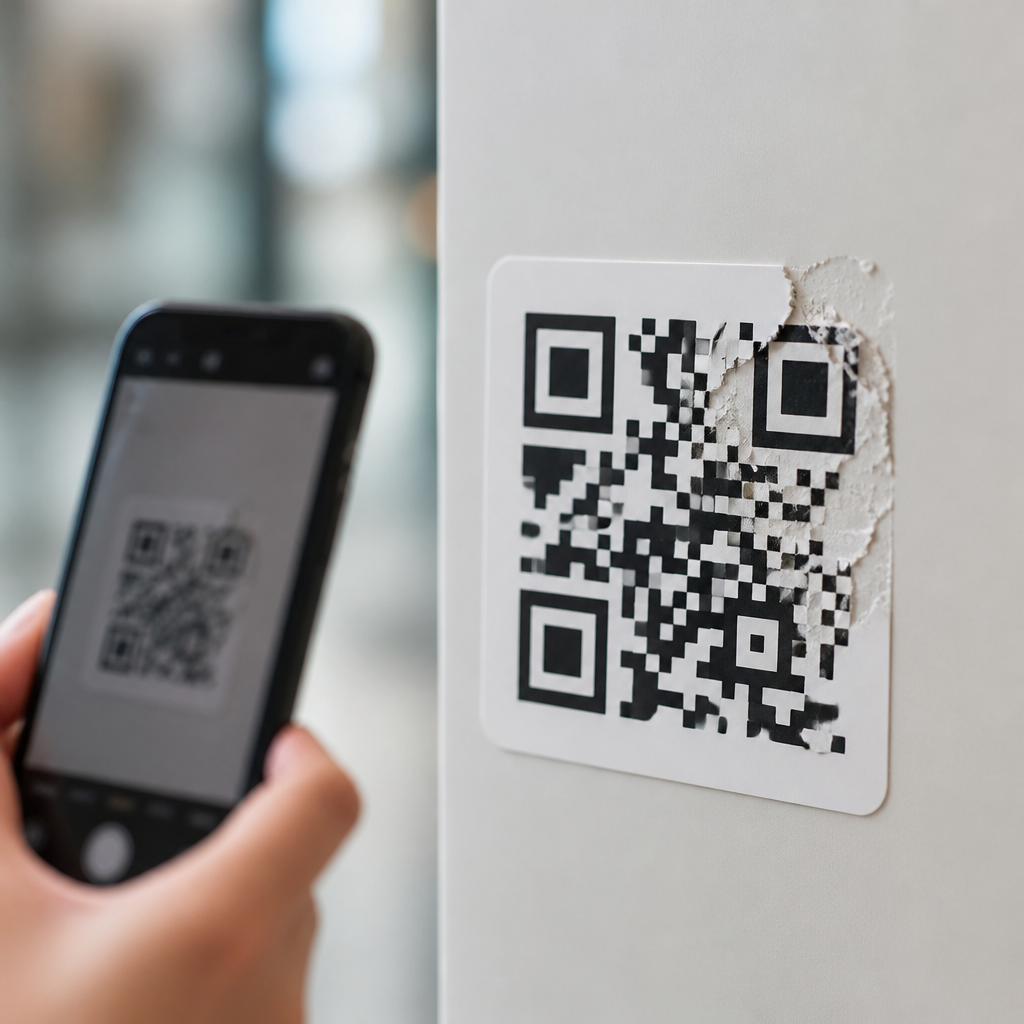
A QR code can still scan after part of it is scratched, smudged, covered, or torn because it is built with redundancy. That resilience is not accidental. It comes from a combination of error correction, smart layout, and decoding rules that let scanners reconstruct missing data from the parts that remain readable. For anyone learning how QR codes work, this is one of the most useful concepts to understand, because it explains why these symbols perform so reliably on packaging, posters, menus, labels, tickets, and industrial parts even in less than perfect conditions.
QR stands for Quick Response. It is a two dimensional matrix barcode made of tiny black and white modules arranged in a square grid. Unlike a traditional one dimensional barcode, which stores data in lines and is usually read left to right, a QR code stores data both horizontally and vertically. That design gives it far greater capacity and allows scanners to identify orientation, separate data regions, and recover information when part of the symbol is damaged. In practice, that means a cracked sticker on a warehouse bin may still scan, or a restaurant table tent with a coffee stain may still open a menu.
I have tested QR codes on glossy labels, corrugated boxes, acrylic signs, and phone screens, and the same lesson appears every time: durability depends less on luck than on engineering choices made when the code is generated. Size, contrast, quiet zone, print quality, and the chosen level of error correction all determine whether a damaged QR code still works. Understanding those mechanics matters for marketers, operations teams, product managers, and anyone publishing a scannable code, because it helps prevent failed scans that waste traffic, delay workflows, or frustrate customers.
How QR codes store and organize data
At a basic level, a QR code converts characters, numbers, or binary data into a pattern of modules. The symbol includes more than raw content. It also contains fixed structural elements that tell a scanner how to read it. Three large squares in the corners are finder patterns. They help the scanner detect the code quickly and determine orientation, even if the symbol is rotated. Smaller alignment patterns correct distortion, especially on curved surfaces such as bottles or flexible packaging. Timing patterns, which alternate dark and light modules, help the scanner map the grid accurately. Format information tells the reader which masking pattern and error correction level are used.
The actual payload is placed in the remaining modules according to the QR Code Model 2 specification defined by ISO/IEC 18004. Data can be encoded in numeric, alphanumeric, byte, or Kanji modes depending on the content. A shorter payload generally creates a less dense symbol, and less density usually improves real world scan reliability. That is why a short dynamic URL often scans better than a long static URL full of tracking parameters. When I build production codes, I nearly always shorten destination links before generating the symbol, because reducing module density gives more tolerance for blur, glare, and partial damage.
Masking is another important concept. During generation, the software applies one of several mask patterns to break up visually awkward areas and prevent large blocks of the same color. This improves scanner interpretation because the code is easier to distinguish from background noise and printing artifacts. Good generators evaluate the available masks and choose the one with the best penalty score under the standard. This step is invisible to most users, but it is part of why two QR codes containing equivalent data can perform differently in the field.
Why damaged QR codes can still scan
The core reason a damaged QR code can still work is Reed Solomon error correction. This is a mathematical method that adds extra codewords to the data so missing or corrupted portions can be reconstructed during decoding. QR codes support four standard levels of protection: Level L recovers about 7 percent of codewords, Level M about 15 percent, Level Q about 25 percent, and Level H about 30 percent. These percentages are often simplified in marketing copy, but the practical takeaway is accurate: higher error correction increases the chance that a partially damaged code remains readable.
Error correction does not mean any random third of the symbol can disappear and scanning will always succeed. Location matters. If damage destroys key functional patterns, such as finder patterns or format information, the scanner may fail before it even reaches the reconstruction stage. Damage also behaves differently from simple dirt. A light smudge may still preserve enough contrast to decode, while a heavy glossy scratch can create reflections that confuse the camera. Even so, because the data and correction codewords are interleaved across the symbol, a localized defect often affects only portions of many blocks instead of completely erasing one section of data. That distribution is a major reason resilience is so strong.
A common real world example is adding a centered logo. Designers often place a brand mark over the middle of a QR code and rely on Level H correction to preserve scannability. This can work, but only within limits. In my testing, a small logo placed carefully away from crucial patterns usually scans well if the code is large enough and the destination is short. Problems start when the overlay is too big, the print is tiny, or the contrast is weak. The code may still scan on a flagship phone in bright light but fail on older devices or under dim indoor lighting. The code is not broken mathematically; it is failing operationally.
What scanners do when reading a QR code
Scanning is a sequence of detection, correction, sampling, and decoding. First, the camera captures an image and software searches for the three finder patterns. Once found, the scanner estimates perspective, rotation, and scale. It then locates timing and alignment patterns to map the grid. After the modules are sampled into binary values, format and version information are read, the mask is removed, and the data codewords are extracted. Finally, the decoder uses error correction to repair corrupted blocks and reconstruct the original message.
This process explains several common scanning outcomes. If a code is blurry because the camera cannot focus, the failure often happens before reliable sampling. If the code is wrinkled on a pouch, alignment patterns become especially important because they help the software compensate for distortion. If sunlight creates glare on a laminated sign, modules that should be dark may appear bright, causing bit errors. Whether the scan succeeds depends on how many errors accumulate and whether correction can absorb them. Modern smartphone libraries such as ZXing, Google ML Kit, and Apple Vision are impressively robust, but they are still bounded by optics, lighting, and image quality.
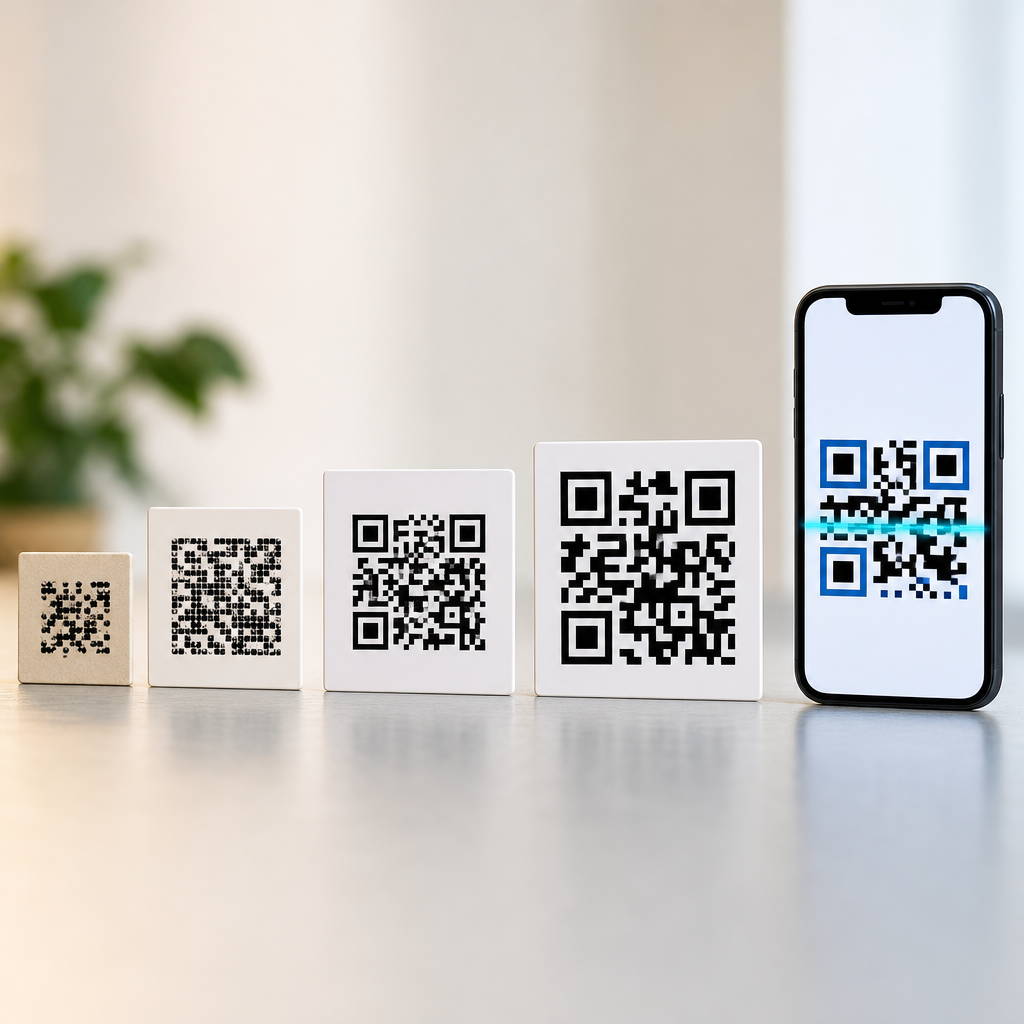
Distance also matters. A useful rule is that the scanning distance should be roughly ten times the width of the code, though this varies by camera and environment. If the code is too small relative to distance, the camera cannot resolve individual modules cleanly. That becomes critical when a symbol has high data density or added branding. In warehouse and manufacturing settings, teams often validate scan performance with the actual devices workers will use rather than assuming any phone can read any printed code. That practical testing step catches issues that theoretical capacity charts miss.
Design choices that improve durability and scan reliability
The strongest QR codes are designed for the use case, not just generated and exported. Contrast is nonnegotiable: dark modules on a light background remain the safest option. The quiet zone, an empty border around the code equal to at least four modules, is essential because scanners use it to distinguish the symbol from nearby graphics. Print size should reflect viewing distance and substrate quality. A code on a business card can be smaller than one on a street poster, while a code printed on textured cardboard generally needs more generous sizing than one on coated paper.
Choosing the right error correction level is a tradeoff. Higher correction increases resilience but also raises module count, making the symbol denser. Denser codes are harder to print and harder to scan at small sizes. That is why I do not automatically choose Level H for every campaign. For a clean digital display or a protected indoor sign, Level M may be the better balance. For product packaging exposed to wear, condensation, or abrasion, Level Q or H is often justified. The best setting depends on environment, payload length, expected device quality, and how much visual customization is planned.
| Factor | Best practice | Why it matters |
|---|---|---|
| Error correction | Use M for clean uses, Q or H for harsher conditions | Higher levels recover more damage but increase density |
| Payload length | Use a short URL or dynamic link | Fewer characters create larger, easier to read modules |
| Quiet zone | Keep at least four modules clear on all sides | Helps the scanner isolate the code from nearby design elements |
| Contrast | Prefer black on white or similarly strong contrast | Improves thresholding in varied lighting |
| Logo overlay | Keep it modest and test on multiple devices | Large overlays can block data beyond repairable limits |
| Print quality | Avoid ink spread, banding, and low resolution output | Poor edges create sampling errors across many modules |
Material choice can make or break results. Curved cans, frosted plastic, brushed metal, and low quality thermal labels all introduce challenges that clean vector artwork alone cannot solve. In one packaging rollout I reviewed, the symbol looked perfect on screen but failed on a flexographic print run because ink gain softened module edges and a dark green background reduced contrast under store lighting. Enlarging the code, switching to a white underprint, and shortening the URL fixed the issue without changing the landing page.
Common causes of failure despite built in error correction
Many scan failures are blamed on damage when the real cause is poor implementation. The most frequent problem is insufficient contrast, especially when brands try to use pastel foreground colors or place a code over photography. Another is removing or shrinking the quiet zone to fit a layout. Decorative frames, shadows, or busy patterns around the code can confuse detection. Extremely small print is another offender. A code may be technically valid but unreadable once printer resolution, paper absorption, and camera noise are considered together.
There are also environmental limits. Motion blur affects codes scanned from moving vehicles or by shaky hands. Condensation on refrigerator doors, scratches on acrylic table stands, and glare from direct sun can all push a valid code past the point of dependable reading. Phone hardware matters too. Newer devices with better sensors, autofocus, and computational photography recover more marginal scans than older budget models. That gap is why field testing should include different devices and lighting scenarios, not just one developer phone in an office.
Another overlooked issue is content strategy. Very long URLs, vCard payloads, and complex Wi Fi strings create denser symbols. Dense symbols are less forgiving when damaged because each module carries more significance and must be printed more precisely. Dynamic QR codes help here because the encoded content can stay short while the destination changes behind the link. That approach improves analytics and editing flexibility, but the operational benefit is often more important: a cleaner, simpler symbol with better scan margins.
How to think about QR code damage in real applications
The best way to think about damage is as a risk management problem. In retail packaging, expect abrasion, flexing, and shelf wear. In restaurants, expect grease, spills, and low light. In manufacturing, expect dust, curved surfaces, and long scan distances. In events, expect cracked screens, wrinkled badges, and fast moving lines. The right QR code design accounts for those realities up front rather than relying on theoretical maximum recovery percentages.
For practical deployment, start with the shortest possible payload, choose an error correction level based on environment, preserve a clean quiet zone, and print larger than your minimum estimate. Then test with the actual cameras, surfaces, and lighting conditions users will encounter. If branding is important, add logos conservatively and validate performance after every design change. This is the workflow teams use when QR codes are tied to revenue, compliance, or operations, because one failed scan in production costs more than a little extra white space on the page.
Damage tolerance is the reason QR codes remain useful in the real world. They are not fragile graphics; they are engineered symbols built to survive imperfections. Once you understand the role of finder patterns, data density, masking, and Reed Solomon correction, the behavior makes sense. A QR code can still work when part of it is damaged because its information is organized to be found, checked, and partially rebuilt. If you create or publish QR codes, apply these principles, test them in context, and treat readability as a design requirement from the start.
Frequently Asked Questions
Why can a QR code still scan even if part of it is damaged?
A QR code can still work when part of it is scratched, smudged, torn, or covered because it is designed with built-in redundancy. Instead of storing data only once in a fragile, all-or-nothing way, QR codes include extra information that helps a scanner recover missing or corrupted sections. This is made possible through error correction, which allows the decoding system to reconstruct data even when some modules, the small black and white squares in the symbol, are no longer readable.
That resilience is also supported by the way a QR code is organized. Key structural patterns, such as the large finder squares in the corners, help the scanner identify orientation and position before it begins decoding the content. Once the code is located and aligned, the scanner reads the remaining visible data and uses error correction rules to fill in the gaps. In practical terms, this is why QR codes perform so reliably in real-world environments where labels get scuffed, printed surfaces crease, or outdoor materials experience wear.
What kind of error correction do QR codes use?
QR codes use a mathematical system called Reed-Solomon error correction. This method adds recovery data to the symbol so that scanners can rebuild parts of the message when some areas are unreadable. It is one of the main reasons QR codes are considered more robust than many older barcode formats. The damaged part does not have to be visually restored by the human eye. As long as enough of the symbol remains intact, the scanner can infer the missing information from the error correction data that was encoded from the start.
There are four standard QR code error correction levels: L, M, Q, and H. These levels roughly correspond to the amount of damage the code can tolerate while still remaining scannable. Level L provides the least redundancy and allows recovery from a smaller amount of damage, while Level H provides the most redundancy and can survive much more obstruction. The tradeoff is that higher error correction uses more of the code’s total capacity, leaving less room for the actual content. That balance between durability and data capacity is a key part of QR code design.
How much damage can a QR code usually tolerate before it stops working?
The answer depends on the error correction level used, the size of the QR code, the quality of the print, and where the damage occurs. In general, a QR code can often withstand a noticeable amount of damage, especially if it was generated with a higher error correction setting. Under ideal conditions, some codes can remain readable even when a significant portion is obscured. However, this does not mean any damaged area is safe. Damage to critical structural regions can cause scanning to fail even if the total damaged area seems small.
Location matters just as much as amount. If a scratch or sticker covers data modules in a noncritical area, the scanner may recover the missing data without much trouble. But if the damage affects finder patterns, alignment patterns, timing patterns, or quiet zones, the scanner may struggle to recognize the symbol at all. In other words, survival is not only about how much of the code is damaged, but also about which parts are damaged and whether the remaining visible information is still enough for the decoding process to work.
Which parts of a QR code are most important for successful scanning?
Some areas of a QR code are especially important because they guide the scanner before the actual content is decoded. The three large squares near the corners, called finder patterns, allow the scanner to detect that the symbol is a QR code and determine its orientation. Timing patterns help define the internal grid, and alignment patterns help correct distortion, especially in larger codes or on curved surfaces. The quiet zone, which is the blank margin around the code, is also essential because it separates the symbol from surrounding text, images, or design elements.
If these structural elements are damaged or blocked, scanning may fail even when much of the data region is still present. By contrast, damage in ordinary data areas is often easier to recover from because error correction can compensate. This is why good QR code placement and design matter so much. A code can handle wear and partial obstruction, but it still needs its core reference features to remain visible so the scanner can interpret everything else correctly.
Does higher error correction always make a QR code better?
Higher error correction usually makes a QR code more durable, but it does not automatically make it better in every situation. When you increase the error correction level, more of the symbol’s capacity is devoted to recovery data. That improves tolerance for scratches, smudges, and partial obstruction, which is valuable for packaging, signage, industrial labels, and other environments where damage is likely. It can also be useful when a logo or design element is placed inside the QR code, since the hidden area effectively acts like intentional damage.
However, the tradeoff is that higher error correction can require a denser or larger QR code for the same amount of content. If the code becomes too small in print or too crowded in detail, scanning performance may suffer, especially on lower-quality materials or older phone cameras. The best choice depends on how the code will be used. For controlled environments, a lower or medium level may be perfectly fine. For harsh, high-contact, or design-heavy applications, a higher level often makes more sense. The goal is not simply to maximize redundancy, but to choose the right balance between capacity, print size, visual design, and real-world reliability.