
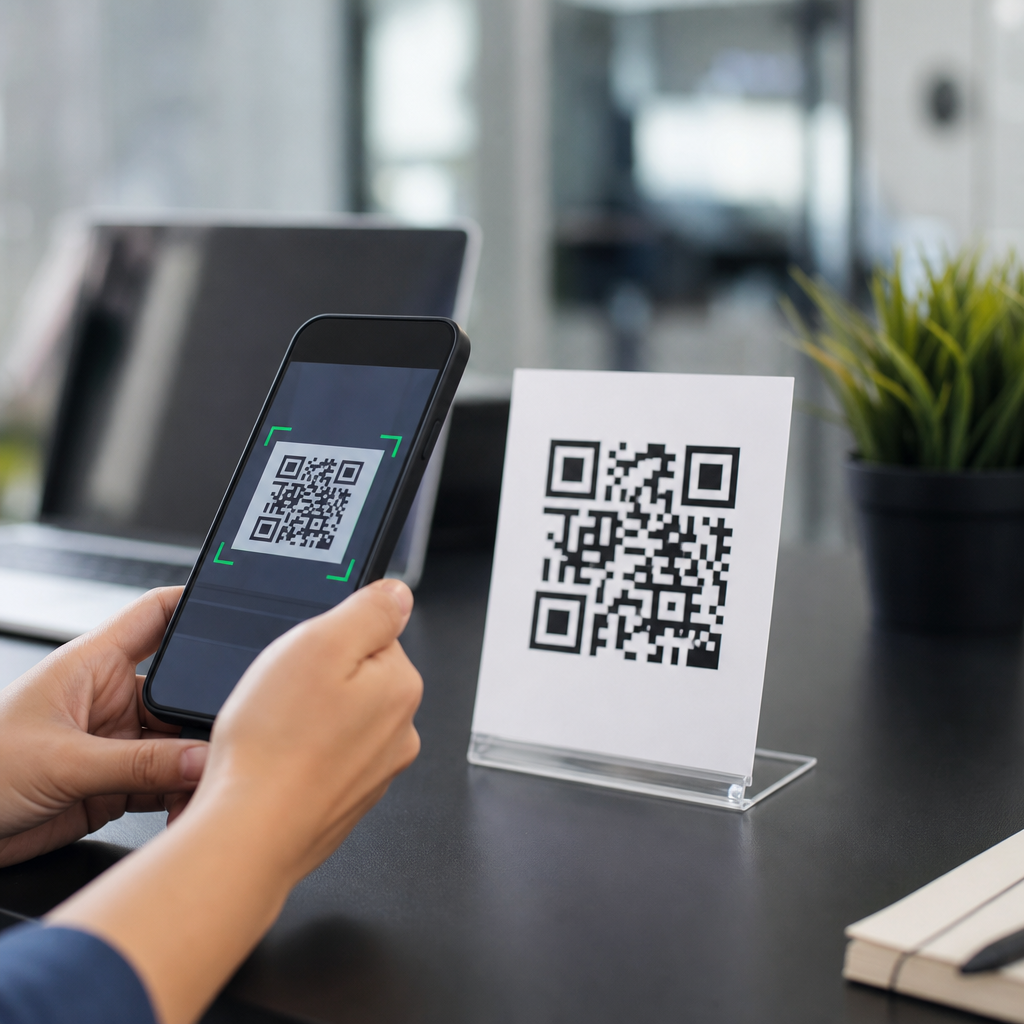
QR stands for Quick Response, a name that captures exactly what the technology was built to do: deliver information instantly when a device scans a square pattern of black and white modules. If you have used a restaurant menu, paid by mobile wallet, joined a Wi-Fi network, or tracked a package, you have already interacted with QR codes in everyday life. As a foundational topic within QR Code Basics & Education, understanding what QR means, where QR codes came from, and how they work gives readers the context needed to use them well and evaluate when they are the right tool.
A QR code is a two-dimensional barcode that stores data both horizontally and vertically, which allows it to hold far more information than a traditional one-dimensional barcode. Standard barcodes usually encode a short numeric identifier that points to a database record. A QR code can directly contain a web address, text, contact details, authentication token, app link, payment string, or other machine-readable data. That capacity, combined with fast scanning from multiple angles, is the practical reason QR codes spread from factory floors to smartphones and consumer marketing.
I have worked with QR implementations in packaging, event operations, retail displays, and digital campaigns, and the same questions come up repeatedly: What does QR stand for, who invented it, why is it square, how much can it store, and are all QR codes the same? This guide answers those questions clearly. It also serves as a hub for the wider topic of what QR codes are, covering their origins, structure, major use cases, strengths, limits, and best practices. Once you understand the basics, decisions about creating, printing, testing, and tracking QR codes become much easier and more reliable.
The term Quick Response originated in Japan in the 1990s. The code was developed by Denso Wave, a subsidiary of the Toyota Group, to improve component tracking in automotive manufacturing. Assembly environments needed a symbol that could be read quickly, even if partially damaged or scanned at an angle, and that could carry more data than the UPC-style labels already in use. The resulting design solved a real operational problem, which is why the name matters: QR does not refer to an abstract acronym chosen for marketing. It describes measurable performance.
What Are QR Codes and How Do They Work?
QR codes are matrix barcodes made of tiny squares arranged on a grid. A scanner, usually a smartphone camera with decoding software, reads the pattern and converts it into usable data. Three large position markers in the corners help the scanner detect orientation instantly, while alignment patterns, timing patterns, format information, and quiet zones support accurate reading. This structure is why a QR code can still scan if rotated, resized within reason, or printed on surfaces that are not perfectly flat.
The technical standard most people mean by QR code is ISO/IEC 18004. That standard defines symbol versions, encoding modes, error correction, masking, and reading behavior. Versions run from 1 to 40, with larger versions containing more modules and therefore more capacity. Depending on the mode used, a QR code can encode numeric, alphanumeric, byte, or kanji data. Reed-Solomon error correction allows the code to remain readable even when part of it is obscured or damaged. In practice, that means a smudged label, scratched poster, or slightly wrinkled package may still scan successfully.
A common misconception is that every QR code leads to a website. Many do, because URLs are convenient and familiar, but that is only one use. A QR code can open a payment screen, draft an SMS, save a vCard contact, add an event to a calendar, trigger app deep linking, connect a device to Wi-Fi, or carry a unique serialized identifier for inventory and authentication. The data inside the code determines the action. The scanner reads raw encoded content first, then the operating system or app interprets what to do with it.
Another distinction that matters is static versus dynamic QR codes. A static QR code contains fixed information directly in the symbol. Once printed, its destination or text cannot be changed without replacing the code. A dynamic QR code usually contains a short redirect URL managed by a platform. Because the destination sits behind that redirect, it can be updated later, and scans can often be tracked by time, device type, location approximation, or campaign source. Dynamic codes are especially useful in marketing, packaging, education materials, and out-of-home placements where reprinting is costly.
Where QR Codes Came From: Meaning and Origins Explained
The QR code was created in 1994 by Masahiro Hara and his team at Denso Wave. Their original use case was industrial traceability. Automotive manufacturing required reading many parts and subassemblies quickly, often in environments where speed and reliability directly affected throughput. Traditional barcodes could not carry enough information in a compact area, and reading them one at a time slowed operations. The Denso team designed a two-dimensional code that could encode more data and be recognized rapidly by scanners, which is the direct source of the term Quick Response.
Denso Wave made an important strategic decision by allowing broad use of the technology while retaining patent rights. That openness accelerated adoption. Manufacturers used QR codes for logistics and inventory. Over time, improvements in mobile cameras and built-in scanning support shifted the technology into consumer life. Japan saw early mainstream use for mobile web access, ticketing, and payments long before many Western markets caught up. The pandemic then accelerated global familiarity because contactless interactions became operationally important in restaurants, healthcare, events, and public services.
The origin story also explains why QR codes are unusually resilient. In factories, labels get dirty, scratched, and bent. A code that failed under those conditions would not survive. Error correction and finder patterns were not decorative design choices; they were engineering answers to production constraints. That industrial DNA still matters today. It is the reason QR codes perform well on shipping labels, laminated menus, printed manuals, museum signs, and equipment tags. The same design choices that solved manufacturing problems now support reliable mobile scanning in consumer settings.
It is also useful to separate QR from related 2D symbols. Data Matrix, Aztec, and PDF417 are different barcode families with their own strengths. Data Matrix is common in healthcare and electronics marking because it works well in very small spaces. Aztec is widely used in transportation tickets because it does not require a large quiet zone. PDF417 appears on identification documents and boarding passes. QR codes became the dominant general-purpose format for consumer interactions largely because smartphone operating systems, camera apps, and mainstream generators standardized around them.
Main Types, Features, and Real-World Uses of QR Codes
When people ask what QR codes are used for, the short answer is information transfer at the moment of intent. In retail, a shelf talker can send a shopper to product specifications, reviews, or replenishment ordering. In hospitality, a table tent can open a menu, payment page, or loyalty program. In events, a registration badge can verify access in seconds. In manufacturing and field service, an equipment label can link technicians to a maintenance log, parts list, or safety procedure. The code acts as a bridge between a physical object and digital content.
The feature set that makes these uses possible is straightforward: high data density, omnidirectional scanning, built-in error correction, and broad device compatibility. Modern phones from Apple and Android ecosystems can scan QR codes directly in the camera app, reducing friction. That matters more than many teams realize. A technically elegant code is useless if users need a separate app, strong lighting, and repeated attempts. Good QR deployments win because they remove effort. The best examples feel invisible: point, scan, and get the expected result immediately.
| QR code use case | Typical encoded content | Why it works well |
|---|---|---|
| Restaurant menus | Dynamic URL to a mobile menu | Easy updates without reprinting tableside materials |
| Payments | Account, merchant, or payment request string | Fast, contactless checkout with fewer manual entry errors |
| Product packaging | URL, serial number, or authentication page | Connects physical products to support, warranty, or verification |
| Events and tickets | Unique token or attendee ID | Supports quick entry and real-time validation |
| Wi-Fi access | Network name, encryption type, and password | Lets users join networks without typing credentials |
| Asset tracking | Serialized identifier linked to a database record | Improves inventory accuracy and maintenance workflows |
There are tradeoffs. More data generally means a denser code, and denser codes are harder to scan at small print sizes or from a distance. Decorative customization can weaken readability if it disrupts contrast, quiet zones, or finder patterns. Dynamic QR codes add flexibility and analytics, but they also introduce platform dependence. If the redirect service fails, expires, or is misconfigured, the printed code becomes ineffective. In my experience, the safest practice is to match the type of QR code to the risk of change, required reporting, and expected lifetime of the printed asset.
Security deserves direct attention as well. A QR code itself is not inherently unsafe, but it can point to a malicious destination just as a hyperlink can. Users should look for trustworthy domains and secure pages before entering credentials or payment details. Organizations should use branded short domains where possible, enable HTTPS, and monitor redirects. In high-trust environments such as payments, identity verification, or healthcare, QR codes should be one layer in a broader security design rather than the only control. That balance is essential for responsible implementation.
Best Practices for Creating and Using QR Codes Effectively
If your goal is reliable scanning, the fundamentals matter more than visual novelty. Start with a clear use case and a single intended action. A poster code should answer one question well, not force users through a cluttered landing page. Keep sufficient contrast, usually dark modules on a light background. Preserve the quiet zone around the symbol. Size the code for the scanning distance; a common rule of thumb is roughly one inch of code size for every ten inches of scanning distance, though testing should always decide the final dimensions.
Content optimization is just as important as print quality. The landing page or payload must match user intent. If a code on product packaging promises setup instructions, the destination should open directly to setup instructions, not a generic home page. Mobile usability is non-negotiable because most scans happen on phones. Pages should load fast, avoid intrusive pop-ups, and present the next step immediately. For campaigns, add UTM parameters or platform analytics so teams can measure scans, engagement, and conversion without guessing what drove results.
Testing should happen in realistic conditions, not only on a designer’s monitor. I routinely test codes across iPhone and Android devices, different lighting conditions, glossy and matte finishes, and expected scan distances. Print one sample before committing to a large run. Check whether logos, gradients, or low-contrast brand colors reduce recognition. Verify redirects after publishing and set up monitoring for dynamic destinations. For operational uses such as tickets or equipment labels, test failure modes too: damaged print, partial obstruction, weak connectivity, and low-end cameras.
For readers exploring the broader QR Code Basics & Education topic, this article is the starting point. From here, the next practical subjects usually include how QR codes work technically, static versus dynamic QR codes, QR code size and printing guidelines, QR code tracking and analytics, customization rules, QR code security, and industry-specific use cases such as menus, payments, inventory, and packaging. Understanding what QR stands for is only the first step, but it anchors every later decision. The better the foundation, the better the outcomes in design, deployment, and measurement.
Why QR Codes Matter Now and What to Remember
QR codes matter because they solve a persistent problem cleanly: connecting offline moments to online actions with almost no friction. Their growth is not a fad driven by novelty. It is the result of mature smartphone cameras, built-in scanning support, and business demand for contactless, trackable, low-cost interactions. From a technical standpoint, QR codes remain one of the most practical bridges between physical media and digital systems. From a user standpoint, they are familiar enough that people no longer need instruction in most contexts, which lowers adoption barriers dramatically.
The essential facts are simple. QR stands for Quick Response. The technology was invented by Denso Wave in 1994 for industrial tracking. A QR code is a two-dimensional barcode that can store different kinds of data and still scan quickly from multiple angles. Its design includes finder patterns and error correction, which is why it performs well even when partially damaged. Not all QR codes are alike: static codes are fixed, while dynamic codes can be updated and measured after printing. Those differences shape how they should be used.
For businesses, educators, publishers, and operations teams, the main benefit is efficiency. A well-made QR code shortens the path between interest and action. It reduces typing, lowers error rates, updates content without replacing physical materials, and can produce measurable engagement signals. The limitation is equally clear: success depends on thoughtful implementation. The destination must be relevant, the code must be easy to scan, and the broader user experience must justify the interaction. Treat the code as part of a system, not as a decorative add-on.
If you are building your knowledge of what QR codes are, use this page as your foundation and then move into the next practical topics: how they work, when to use static or dynamic formats, how to size and print them, and how to measure performance responsibly. Start with one clear use case, test it in real conditions, and improve from actual scan behavior. That approach turns a simple square into a dependable tool.
Frequently Asked Questions
What does QR stand for, and why is it called that?
QR stands for Quick Response. The name reflects the main purpose of the technology: to let users access information quickly by scanning a code with a camera-equipped device. Unlike traditional one-dimensional barcodes, which usually store a limited amount of data in a single direction, QR codes are two-dimensional and can hold much more information. That means they can be read rapidly and from multiple angles, making them especially practical for fast interactions in everyday settings.
The term “Quick Response” is not just a marketing label. It describes the real user experience. A person can point a smartphone at a QR code and instantly open a website, download contact details, connect to Wi-Fi, make a payment, or view a menu. The speed and convenience of that interaction are exactly why QR codes became so widely adopted across industries. In short, the acronym explains both the name and the value of the technology: quick access to digital information through a simple scan.
Where did QR codes come from, and who invented them?
QR codes were invented in Japan in the 1990s by Denso Wave, a company that was part of the Toyota Group. The technology was originally developed to improve tracking in manufacturing, especially in the automotive industry. At the time, businesses needed a better way to store and scan more information than conventional barcodes could handle. Traditional barcodes worked well for basic product identification, but they were limited in data capacity and scanning flexibility.
Denso Wave introduced the QR code in 1994 as a more advanced solution. Its square design allowed it to hold significantly more data and to be scanned quickly from different directions. This made it highly efficient for industrial workflows, where speed and accuracy matter. Over time, the usefulness of QR codes extended far beyond factories. As smartphones became common and mobile cameras improved, QR codes moved into mainstream public use for marketing, payments, authentication, logistics, event access, and many other applications. Today, they are recognized globally as one of the most versatile data-sharing tools in modern digital communication.
How do QR codes work?
A QR code works by encoding information into a grid of black and white squares called modules. When a smartphone or scanner reads the pattern, software interprets the arrangement of those modules and converts it into usable data. That data might be a website URL, plain text, contact information, a payment instruction, login credentials, or other digital content. The scanning device does not “understand” the code visually in the way a person reads words; instead, it analyzes the position and pattern of the squares using image recognition and decoding algorithms.
One reason QR codes are so effective is their structure. They include built-in positioning markers, usually the three larger squares in the corners, which help the scanner detect the code’s orientation instantly. This allows the code to be read even if it is tilted, resized, or placed on curved packaging. QR codes also use error correction, which means they can still function even if part of the code is smudged, scratched, or partially obscured. This combination of high data density, fast recognition, and error tolerance is what makes QR codes reliable in real-world environments, from printed labels to posters, menus, and product boxes.
How are QR codes different from traditional barcodes?
The biggest difference is that traditional barcodes are one-dimensional, while QR codes are two-dimensional. A standard barcode stores data horizontally using a series of vertical lines and spaces. Because of this format, it can only hold a relatively small amount of information, often just a product identifier that must be matched to a database. A QR code, by contrast, stores data both horizontally and vertically in a square grid, allowing it to contain far more information directly within the code itself.
This design gives QR codes several major advantages. They can be scanned faster, from multiple angles, and often with ordinary smartphone cameras instead of specialized equipment. They can also store different types of data, including URLs, text, phone numbers, email addresses, app links, and payment information. In practical terms, that means a barcode usually points to a product record, while a QR code can immediately trigger an action or provide complete information. That added flexibility is a major reason QR codes are used in consumer experiences like mobile checkout, contactless menus, digital tickets, and easy device connections.
Why are QR codes so common today in payments, menus, Wi-Fi access, and package tracking?
QR codes have become common because they solve a simple but widespread problem: how to connect the physical world to digital information quickly and with minimal friction. Businesses and organizations use them because they are inexpensive to create, easy to print, simple to deploy, and familiar to users. Consumers use them because scanning a code is fast and convenient. Instead of typing a long website address, password, or tracking number, a person can simply scan and arrive at the right destination in seconds.
Their versatility also explains their popularity. In restaurants, QR codes can open digital menus instantly. In retail and finance, they support mobile wallet payments and checkout workflows. In offices and homes, they can simplify Wi-Fi access by encoding network credentials. In shipping and logistics, they help track parcels and verify delivery information efficiently. As smartphone scanning became built into mobile operating systems, the barrier to using QR codes dropped dramatically. What started as an industrial tracking tool evolved into a universal shortcut for instant digital interaction, which is exactly why the meaning behind “Quick Response” remains so relevant today.





