
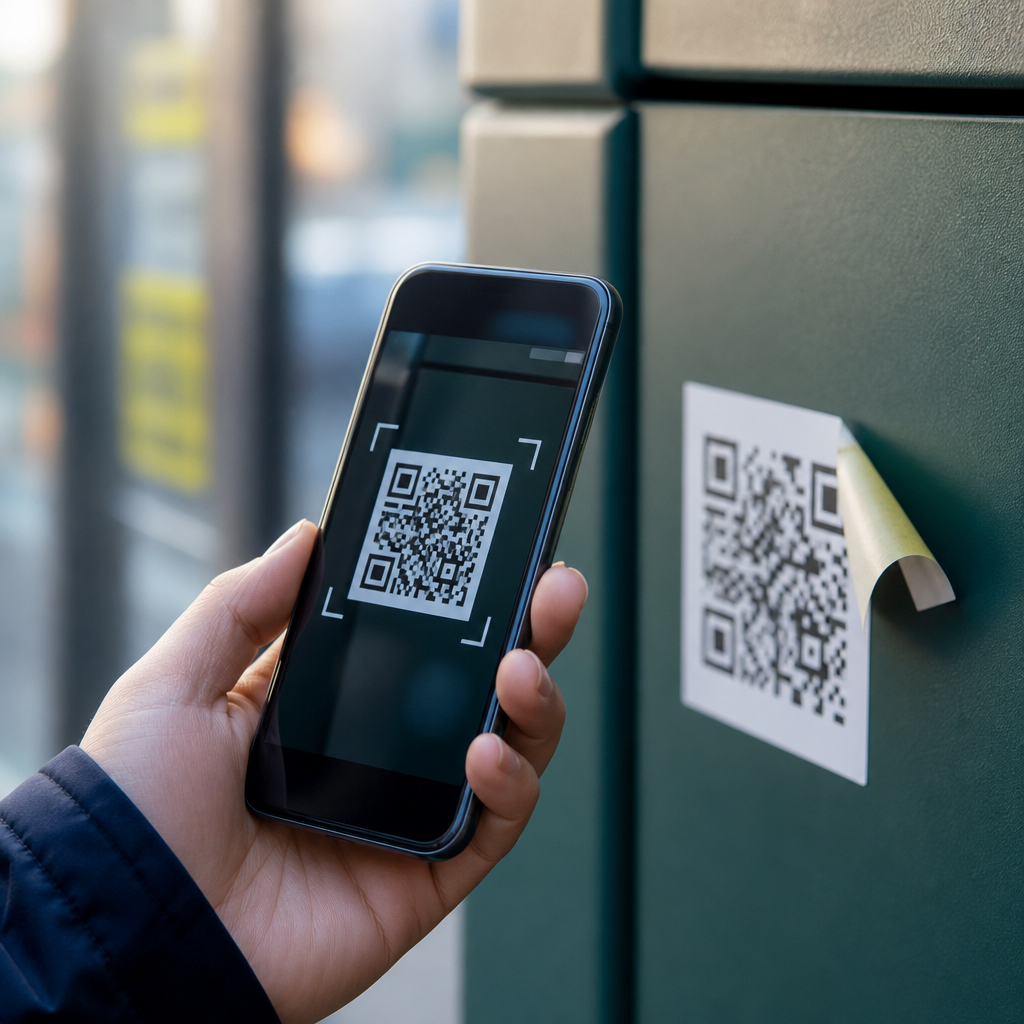
QR codes are now embedded in everyday life, from restaurant menus and parking meters to payment screens, package tracking labels, and medical forms, which makes real examples of QR code scams especially important to understand. A QR code, or Quick Response code, is a two-dimensional barcode that stores information such as a website address, payment request, Wi-Fi login, contact card, or app deep link. The convenience is obvious: point a phone camera, tap once, and jump directly into an action. The security problem is just as obvious to anyone who has investigated phishing or payment fraud: people cannot visually inspect a QR code the way they can read a written web address. That gap between speed and visibility is where attackers operate.
I have seen organizations roll out QR campaigns without basic review controls, and I have also seen consumers trust codes simply because they were printed neatly on a sign or sticker. Scam operators know this. They place fake codes on parking kiosks, replace legitimate restaurant table codes, send QR images in email messages, and print malicious labels for package redirection. Security teams now use the term quishing to describe phishing conducted through QR codes. The tactic works because it bypasses habits people developed for suspicious links. Many users know not to click a strange URL in an email, yet they will scan a code because it feels like an offline object.
This matters to consumers, businesses, schools, healthcare providers, and public agencies. A fraudulent scan can lead to credential theft, card fraud, malware installation, account takeover, or simple but costly misdirection of payment. It also creates compliance and privacy exposure when customer data is sent to an attacker-controlled landing page. Understanding real examples of QR code scams helps readers recognize patterns, assess risk, and build safer processes. This hub article explains the main scam categories, shows how they work in practice, and highlights the controls that reduce exposure without eliminating the convenience that made QR codes popular in the first place.
Fake parking meter QR codes
One of the clearest real examples of QR code scams involves fake stickers placed over legitimate parking payment codes. Cities in the United States, the United Kingdom, and Australia have all warned drivers about this pattern. The scam is simple. A criminal prints a convincing QR code label, places it on a parking machine or nearby sign, and directs drivers to a fake payment page that imitates the local parking app or municipal portal. The victim enters plate information, name, card details, and sometimes a phone number. The attacker steals the payment card data, and in some cases the victim still receives a parking ticket because no real session was ever created.
The reason this scam succeeds is environmental pressure. Drivers are usually standing on a sidewalk, in a hurry, and focused on avoiding a citation. They do not compare the page domain against the official parking provider, and many payment kiosks are already branded with third-party names users do not recognize. In incident reviews I have worked on, the strongest preventive control was not a more complex app flow but a clearer process: publish the official payment domain on the meter, inspect machines regularly for sticker tampering, and teach users to open the approved parking app directly instead of scanning any code attached to public hardware.
Restaurant menu replacement scams
Restaurants accelerated QR menu adoption during the pandemic, and scammers quickly learned how easy it was to swap a table tent or overlay a sticker. In a typical restaurant QR code scam, the customer scans a code expecting a menu but lands on a fake ordering page, a credential prompt, or a payment form for a deposit, reservation, or loyalty login. Because diners are seated, socially engaged, and expecting a mobile experience, they often comply without questioning why a menu needs card details or a social sign-in. Attackers exploit trust in the venue rather than trust in the code itself.
This is especially risky for multi-location restaurants and franchises. Brand inconsistency already confuses users, so a fake landing page can look plausible with copied logos, menu photos, and pricing scraped from legitimate sites. A well-designed scam page may collect names, emails, card details, and saved addresses in a single visit. The practical defense is operational discipline: use tamper-evident displays, limit menu codes to one approved domain, and verify that every table code resolves to the same path structure. If a menu suddenly asks for credentials or payment before showing dishes, treat it as suspicious immediately.
Email and document quishing attacks
QR scams are not limited to physical spaces. In corporate environments, one of the fastest-growing threats is the QR code embedded in email, PDF attachments, invoices, HR forms, or shared documents. The message often claims there is a secure voicemail, payroll update, multifactor authentication reset, or document requiring signature. Instead of a visible hyperlink that email gateways can rewrite or score, the attacker uses an image-based QR code to move the user from a managed desktop to a personal phone. That shift breaks several enterprise defenses at once.
I have seen these attacks imitate Microsoft 365, Okta, DocuSign, and internal single sign-on portals with convincing accuracy. The victim scans the code, reaches a cloned login page, and enters credentials plus a one-time passcode. The attacker captures the session in real time. Security vendors including Microsoft, Cisco, and Zscaler have all documented increased quishing activity because image-based lures can evade basic link scanning and exploit bring-your-own-device habits. The most effective response combines awareness and technical controls: block high-risk QR images in external mail where feasible, inspect image content with OCR and computer vision tools, and teach users that a QR code requesting enterprise credentials deserves the same skepticism as any unsolicited login link.
Package delivery and missed-delivery scams
Another common pattern appears in package delivery. Victims receive a text, printed door tag, or email saying a parcel could not be delivered and must be rescheduled by scanning a QR code. The code may lead to a fake courier page that requests address confirmation, a small redelivery fee, or account login. Criminals favor this theme because parcel notifications are routine, especially during holidays, and people expect fast mobile actions from carriers. The requested payment is often small enough to avoid scrutiny, but the real goal may be card theft or identity data collection.
Physical versions are particularly deceptive. A fraudulent sticker can be placed on an apartment mailroom notice board or attached to a fake delivery slip. Consumers should know that major carriers usually provide tracking through official apps, tracking numbers, or known domains, not anonymous QR images posted in communal spaces. Businesses can reduce exposure by training front-desk and mailroom staff to remove unapproved notices and verify courier communications through account dashboards rather than scans. A useful rule is simple: if the package alert creates urgency and asks for payment, verify through the carrier’s official channel first.
Payment transfer and crypto wallet scams
QR codes are built into modern payments, which makes them attractive to fraudsters. Some scams replace a merchant’s payment code with an attacker’s code, redirecting funds instantly. Others target cryptocurrency users by presenting wallet addresses as QR codes on fake support pages, livestream giveaways, or cloned donation campaigns. Because blockchain transfers are irreversible, a single scan can permanently misdirect funds. Even traditional banking and peer-to-peer payment users are at risk when a scammer sends a QR request claiming to be customer support, a landlord, or an event organizer.
The table below compares common payment-focused QR code scam scenarios and the practical signals that separate them from legitimate use.
| Scenario | How the scam works | Primary risk | What to verify |
|---|---|---|---|
| Parking meter payment | Sticker sends user to fake municipal checkout | Card theft, unpaid parking | Official app name, exact domain, tampering on machine |
| Restaurant ordering | Fake menu page asks for login or prepayment | Credential theft, card fraud | Menu should load before payment, single approved domain |
| Crypto transfer | QR encodes attacker wallet instead of real address | Irreversible loss of funds | Cross-check address, use saved contacts, small test transfer |
| Peer-to-peer payment request | Code redirects to lookalike payment page or wrong payee | Misdirected transfer | Recipient identity, app-native confirmation screen |
In payment environments, verification must happen before authorization, not after. Merchants should secure displays, reconcile payment destination accounts, and audit who can generate or replace codes. Consumers should preview the URL when possible, confirm the payee name in the app-native confirmation screen, and avoid scanning codes sent through unsolicited messages. For crypto specifically, use whitelisted addresses and test transactions for larger transfers. Convenience is not a control; process is.
Public poster, charity, and event ticket scams
Attackers also exploit trust in public campaigns. A QR code on a poster for a concert, charity drive, transit update, or community event can route users to counterfeit ticketing pages, fake donation portals, or malware-hosting sites. During disasters and high-profile fundraisers, this becomes more damaging because people are emotionally primed to act fast. I have reviewed cases where a cloned charity page used an almost identical logo and copied mission statement, while the only real difference was the payment destination and domain spelling.
Ticketing scams use the same mechanics. A code on social media or a flyer promises limited seats, early access, or a discount, then collects payment or account credentials for a ticketing platform. Fraudsters know buyers fear missing out, so they set short countdown timers and scarcity messages. The defense is straightforward but often ignored: navigate to the venue, organizer, or charity site directly, confirm registration details independently, and avoid donation or ticket purchases initiated from unverified physical posters. Organizations running public campaigns should register clear, memorable domains and monitor for impersonation pages.
How to spot QR code scams before you scan
The safest approach is to treat QR codes as hidden links, not trusted objects. Before scanning, inspect the context. Is the code on a sticker that could have been placed over another label? Is it asking for an action that does not fit the situation, such as a menu requesting payroll login or a delivery slip requesting crypto payment? After scanning, pause at the preview stage if your camera or security app shows the destination. Look for the exact domain, not just familiar branding. Attackers rely on lookalike domains, subdomains, and URL shorteners to hide ownership.
On managed devices, mobile threat defense tools such as Microsoft Defender for Endpoint, Lookout, and Zimperium can help inspect links and block known malicious destinations. For organizations, the stronger long-term control is governance. Maintain an inventory of published QR codes, assign ownership, use dynamic code platforms with access logs, and review landing pages for unnecessary data collection. In regulated sectors, map every scan flow to privacy notices, retention rules, and vendor due diligence requirements. If a QR journey collects personal or payment data, it should be reviewed with the same rigor as any web form or checkout flow.
Real examples of QR code scams show a consistent lesson: the code is rarely the whole fraud. The real attack is misplaced trust in the context around it. Scammers win when people assume a printed square is safer than a typed link, or when businesses deploy QR experiences without ownership, inspection, and verification controls. The most common scams involve parking payments, restaurant menus, email-based quishing, package delivery notices, payment transfers, charity appeals, and ticket offers. Each uses urgency, convenience, or familiarity to lower scrutiny at the exact moment a victim is asked to act.
The practical benefit of understanding these patterns is immediate. Consumers can slow down, inspect the source, preview the destination, and use official apps or saved sites instead of public scans. Businesses can secure physical placements, monitor domains, inventory active codes, and train staff to treat QR journeys as part of the attack surface. Start by auditing every QR code your organization publishes or routinely encounters, then remove any experience that cannot be verified end to end. That single step reduces risk quickly and makes every future scan more defensible.
Frequently Asked Questions
What are some real-world examples of QR code scams people should know about?
Real examples of QR code scams usually follow one simple pattern: a scammer places a malicious QR code in a context where people already expect to scan one. One common example involves parking meters. Criminals place a sticker with a fake QR code over the legitimate payment code, sending drivers to a lookalike website that steals card details or collects payment without ever paying for the parking session. Another frequent example appears in restaurants, where fake QR codes are placed over digital menu links and redirect users to phishing pages, malware downloads, or fake payment portals. Package delivery scams are also widespread. Victims receive texts or emails claiming there is a delivery issue and are urged to scan a QR code to reschedule, pay a small fee, or confirm their address; the scan leads to credential theft or fraudulent charges.
Scammers also use QR codes in public spaces such as flyers, posters, utility bills, and even medical or administrative forms. For example, a fake QR code can be added to a charity poster and direct donations into a criminal-controlled account. In office settings, phishing emails may include a QR code instead of a clickable link to bypass email security filters and trick users into entering Microsoft 365, Google, or banking login credentials on a fake mobile site. There have also been cases involving cryptocurrency payments, where a scammer replaces a legitimate wallet QR code with their own, causing funds to be sent to the wrong address instantly and irreversibly. These examples matter because they show that the danger is not the QR code itself, but the trust built into the environment around it.
Why are QR code scams so effective compared with traditional phishing links?
QR code scams are effective because they remove many of the visual warning signs people have learned to watch for online. When someone receives a suspicious email link, they may hover over it, inspect the URL, or hesitate before clicking. With a QR code, that inspection step often disappears. Users scan, see a brief preview if their device shows one, and quickly tap through because the process feels frictionless and familiar. That convenience is exactly what scammers exploit. A QR code also creates a sense of legitimacy because people now associate scanning with normal activities like paying for parking, opening menus, tracking packages, joining Wi-Fi, verifying accounts, or checking in at appointments.
Another reason these scams work is that they frequently push the interaction onto a mobile device, where security cues are smaller and easier to miss. Fake domains can be harder to evaluate on a phone screen, and mobile users are often moving, multitasking, or in a hurry. In business environments, QR code phishing has become particularly effective because it can bypass some email defenses that are better at detecting malicious links than malicious images containing QR codes. A message may look simple and professional: “Scan to review secure document” or “Scan to reset your password.” Once scanned, the victim lands on a polished fake login page and enters credentials without realizing anything is wrong. In short, QR scams combine social engineering, convenience, and reduced visibility into one highly persuasive attack method.
How can I tell whether a QR code is legitimate before I scan it?
The safest approach is to evaluate the context before you ever point your camera at the code. Ask whether a QR code actually makes sense in that situation. If a parking meter already has visible instructions and the QR code appears as a sticker placed on top of another label, that is a major warning sign. If a restaurant menu code is damaged, crooked, recently pasted on, or inconsistent with the venue’s branding, be cautious. With emails, texts, and printed notices, consider whether the sender normally uses QR codes for that purpose. A bank, employer, hospital, or delivery service may have legitimate uses for QR codes, but unexpected pressure to scan one urgently should always raise suspicion.
After scanning, do not rush to tap through. Many smartphones show a preview of the destination URL. Read it carefully. Look for misspellings, extra words, unusual domains, random strings, or country-code extensions that do not match the brand you expect. For example, a payment page pretending to be from a city parking authority should not lead to an unrelated or generic domain. Also be alert if the QR code launches an app install, requests payment immediately, asks for login credentials you did not expect to provide, or prompts you to download a file. When in doubt, skip the code and navigate manually. Type the official website yourself, use the business’s official app, or ask staff for the correct link. The extra few seconds are often enough to avoid a costly mistake.
What should I do if I scanned a suspicious QR code or entered information after scanning one?
If you scanned a suspicious QR code, stop interacting with the page immediately. Do not enter any more information, download any files, approve any login request, or complete any payment. If you already submitted credentials, change the affected password right away from a trusted device by going directly to the official website or app, not through the QR code page. If the same password was reused elsewhere, change those accounts too. Enable multi-factor authentication if it is not already active, especially for email, banking, cloud storage, and work accounts. Email access is particularly critical because attackers often use it to reset passwords for other services.
If you entered payment information, contact your bank or card issuer immediately, explain that the transaction may have involved a QR phishing scam, and ask them to monitor or freeze the card as needed. Review recent transactions for any unauthorized activity. If you downloaded an app or file, uninstall it if possible and run a reputable mobile security scan. On a managed work device, contact your IT or security team right away so they can investigate. It is also wise to report the scam to the affected business or organization, especially if the fake QR code was physically posted at a location others may scan. Quick reporting can protect other people and may help remove the code before more victims are affected.
What are the best ways to protect myself from QR code scams in daily life?
The most effective protection is to treat QR codes the same way you would treat unknown links: as untrusted until verified. Scan only when there is a clear reason, and prefer official sources whenever possible. For parking, use the city’s official app or type the known payment website manually. For restaurants, verify with staff if anything looks unusual. For package delivery, ignore QR codes sent in unexpected messages and instead check status directly through the courier’s official website or app. For bills, donations, and payments, confirm the destination independently before sending money. This mindset shift is important because QR codes feel passive and convenient, but they can trigger high-risk actions instantly.
It also helps to use the security features already built into your devices. Keep your phone and apps updated, since newer versions often improve phishing and malware protections. Use a password manager so you are less likely to enter credentials on fake sites; many password managers will not autofill on the wrong domain, which can serve as a warning. Turn on multi-factor authentication for important accounts. In workplaces, user awareness training should now include QR-based phishing, not just email links and attachments. Finally, slow down. Most QR scams depend on speed, distraction, and habit. A brief pause to inspect the destination, confirm the source, and think through the request is one of the strongest defenses you have.





