
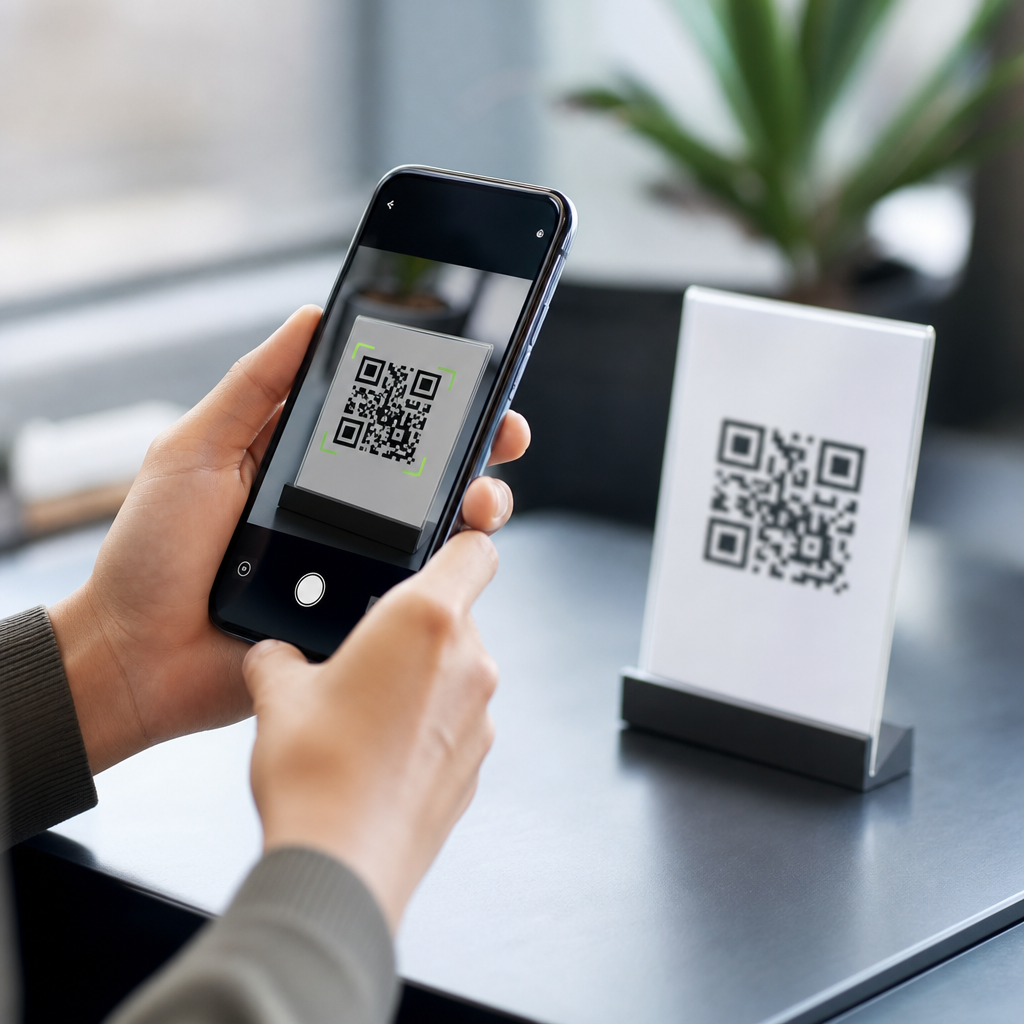
QR code scanning on smartphones looks effortless, but several hardware and software systems work together in milliseconds to turn a printed square into useful action. A QR code, short for Quick Response code, is a two-dimensional matrix barcode that stores data in both horizontal and vertical patterns, allowing it to hold far more information than a traditional one-dimensional barcode. When someone points a phone camera at a QR code, the device captures an image, identifies the code’s structure, decodes the embedded data, and then decides what to do with that content, such as opening a website, saving contact information, joining Wi-Fi, or launching a payment flow. Understanding how QR code scanning works matters because QR codes now sit at the center of retail checkout, restaurant menus, digital tickets, product packaging, healthcare intake, warehouse operations, and consumer marketing.
In practice, I have seen businesses treat QR scanning as if it were magic, then struggle when low contrast printing, glare, or weak mobile connections break the experience. The reality is more concrete. Smartphone QR code scanning depends on camera optics, image signal processing, computer vision, error correction, and operating system rules that recognize standardized data formats. Most modern phones support native QR scanning directly from the camera app, while others still rely on scanning inside apps such as Google Lens, payment wallets, social apps, or enterprise tools. For anyone learning QR code basics, this hub explains the mechanics behind scanning, the conditions that affect speed and accuracy, and the technical building blocks that make QR codes reliable in everyday use.
The anatomy of a QR code and what the camera is looking for
A smartphone does not read a QR code the way a person reads text. It first looks for distinctive geometric cues that tell the software a QR code is present. The three large squares in the corners are called finder patterns. They help the scanner detect the code quickly and determine its orientation, even if the code is rotated. A smaller alignment pattern, used on many versions, helps the software correct distortion when the code is printed on curved or angled surfaces. Timing patterns, which are alternating black and white modules between finder patterns, establish the grid. Quiet zone space around the outside gives the scanner visual separation from the background. Without that margin, scans often fail.
The black and white tiny squares are called modules, and together they encode data according to a fixed symbol structure defined in ISO standards for QR codes. The code can store numeric, alphanumeric, byte, or kanji data, and it includes format information that tells the decoder which mask pattern and error correction level were used. Versions range from small symbols with fewer modules to much denser codes that hold more data. In plain terms, the smartphone camera is not hunting for a URL first. It is hunting for a square grid with recognizable locator patterns, then reconstructing that grid accurately enough to extract the binary data hidden inside it.
How a smartphone camera captures the code
The scanning process starts with image capture. Smartphone cameras gather light through a lens onto an image sensor, typically a CMOS sensor, which converts the scene into digital pixel values. Before the QR scanner even begins decoding, the phone applies autofocus, exposure control, white balance, sharpening, and noise reduction. These steps matter because QR scanning depends on clean edge contrast. If a code is too small in frame, out of focus, or washed out by backlighting, the software may detect a square shape but fail to resolve the module pattern inside it.
Camera quality influences performance, but software optimization often matters more than megapixels. A ten-year-old high-resolution sensor can still scan poorly in dim light, while a newer midrange phone can scan instantly because its image pipeline handles contrast and focus better. On current iPhone and Android devices, native scanning often runs continuously on live preview frames rather than on a single captured photo. That means the device evaluates multiple frames per second and locks onto the code as soon as one frame is sharp enough. This is why holding the phone steady, filling a reasonable portion of the screen with the code, and avoiding glare usually produces immediate results.
Computer vision turns an image into a readable symbol
Once the camera provides a usable frame, the decoding engine applies computer vision steps to isolate the QR code. First, it searches the image for candidate shapes that resemble finder patterns: square regions with a distinctive black-white-black ratio. Next, it groups likely patterns together to confirm that three corners align in a way consistent with a QR code. Then it estimates perspective. If the code is tilted, printed on a label wrapped around a bottle, or viewed from one side, the software uses geometric transformation to map the distorted shape back onto a flat square grid.
After the grid is normalized, the scanner samples each module position and decides whether it represents black or white. This is not always trivial. Real-world images contain blur, shadows, reflections, color gradients, and printing defects. Good decoders use thresholding and adaptive binarization to separate foreground from background under uneven lighting. Libraries such as ZXing and ML Kit became popular because they perform these tasks efficiently on mobile hardware. The scanner then reads format bits, removes the masking pattern applied during code generation, and reconstructs the original sequence of codewords. Only after this step can the smartphone interpret the payload, such as a URL, text string, calendar event, or payment token.
Error correction is why damaged QR codes still scan
One reason QR codes became dominant is their resilience. QR symbols use Reed-Solomon error correction, a mathematical method that allows missing or damaged portions of the code to be reconstructed. Four common error correction levels are used: L, M, Q, and H. Higher levels reserve more of the symbol for recovery data and reduce total storage capacity, but they make the code more tolerant of scratches, dirt, wrinkles, or design overlays. In campaigns where logos are placed in the middle of the code, designers often choose a higher level so the scanner can recover hidden or obstructed modules.
In practical deployments, error correction solves many but not all problems. I have tested codes on shipping cartons with torn corners that still scanned because finder patterns and enough data remained intact. I have also seen beautiful branded codes fail because the quiet zone was trimmed, the foreground color was too light, or a glossy lamination created specular highlights. Error correction cannot compensate for every design mistake. It helps recover data after the symbol is detected and sampled, but the camera still needs sufficient contrast and structure to find the code in the first place.
What happens after the phone decodes the data
After decoding, the smartphone classifies the content. If the payload is a web URL, the camera app or scanner offers a prompt to open the browser. If it is a vCard, the phone may offer to create a contact. If it contains a Wi-Fi configuration string, the operating system can prefill the network name, password, and security type so the user can join without typing. Event formats can open the calendar, map links can launch navigation apps, and payment payloads can route users into wallet or banking workflows. The scanner is therefore both a decoder and a content interpreter.
Security controls also appear at this stage. Phones generally do not execute QR content silently. They present a preview or notification so users can confirm the action, especially for links. This matters because a QR code can encode a malicious URL just as easily as a benign one. Mobile operating systems and browser safe-browsing services may warn users about known harmful destinations, but the most reliable defense is still user verification. In enterprise environments, managed devices may restrict which apps can handle scanned payloads, and specialized scanners can route the decoded data directly into inventory, asset management, or field service systems.
Native scanning, app-based scanning, and performance differences
Not all smartphone scanning experiences are identical. Native camera scanning is now standard on current iPhones and most Android phones, and it is usually the fastest path because the feature is integrated with the camera framework and operating system. App-based scanning remains common in payment apps, social platforms, loyalty apps, and logistics software because it lets organizations control the next step after decoding. A retailer may want a code to open an in-app coupon wallet rather than a browser. A warehouse app may scan dozens of codes in sequence and append data directly to a picking workflow.
| Scanning option | Best use case | Strength | Limitation |
|---|---|---|---|
| Native camera app | Consumer links, menus, tickets | Fast and frictionless | Less workflow customization |
| Google Lens or similar visual tools | Mixed visual search and QR reading | Strong recognition and context | Extra tap or app handoff |
| Brand or payment app | Loyalty, checkout, wallet actions | Controlled user journey | User must install app |
| Enterprise scanning app | Inventory, field service, asset tracking | Batch processing and system integration | Training and device management needed |
Performance differences usually come down to autofocus behavior, low-light handling, decoder quality, and how aggressively the app searches preview frames. Dedicated enterprise devices from Zebra or Datalogic still outperform general smartphones in difficult warehouse conditions because they pair optimized optics with tuned scanning engines and rugged aiming workflows. However, consumer phones have closed the gap enough that many teams now use bring-your-own-device scanning for attendance, visitor check-in, and simple stock tasks. When choosing a scanning method, the right question is not just “Can it scan?” but “Can it scan reliably in the actual environment where people will use it?”
Why some QR codes scan instantly and others fail
Several conditions determine whether a smartphone can scan a QR code quickly. Size is one factor. A tiny code on a poster viewed from three meters away may not occupy enough pixels for the decoder to resolve individual modules. Contrast is another. Dark symbols on a light background work best; pastel-on-pastel designs often fail. Print quality matters because blurred edges confuse thresholding. Surface finish matters because glossy coatings create glare that wipes out module detail. Curved placement on bottles, cans, and flexible pouches introduces distortion, which alignment patterns can help but not fully overcome if the code wraps too tightly.
Data density also plays a role. The more information stored in a QR code, the more modules it needs, and the smaller each module becomes at a fixed print size. This is why short dynamic URLs generally scan more easily than long static URLs with tracking parameters embedded directly in the symbol. Testing is essential. I advise teams to print production samples, not just view codes on a desktop monitor, then test across older Android phones, current iPhones, different lighting conditions, and realistic user distances. A QR code that scans in ideal office light may struggle on a restaurant table under warm reflections or on outdoor signage in direct sun. Good QR performance is designed, not assumed.
How QR scanning fits into the broader QR code workflow
Scanning is only one part of how QR codes work. Upstream, someone creates the code using a generator, chooses static or dynamic behavior, sets the error correction level, and exports artwork in raster or vector format for print or screen display. Downstream, the scan may lead to analytics, redirects, authentication checks, payment processing, or CRM tagging. That broader workflow explains why QR code scanning is often discussed alongside URL shorteners, campaign attribution, POS integrations, and first-party data collection. The symbol itself is merely a transport layer between the physical world and a digital action.
As a hub topic within QR Code Basics & Education, smartphone scanning connects directly to related subjects people usually need next: QR code structure, static versus dynamic QR codes, QR code error correction, best practices for QR code size and placement, secure QR scanning, and how to test QR codes before launch. Those topics deepen understanding, but the central point remains simple. A smartphone scans a QR code by capturing a clear image, detecting standard reference patterns, correcting distortion, decoding the data with error recovery, and passing the result to the right app or system. When businesses understand each stage, they make better design, printing, and deployment decisions.
Smartphone QR code scanning works because modern phones combine optics, image processing, computer vision, standardized encoding, and content handling into one fast interaction. The user sees a camera pointed at a square. Behind the scenes, the phone locates finder patterns, straightens the symbol, reads module values, applies error correction, and interprets the payload according to recognized formats such as URLs, Wi-Fi strings, contacts, tickets, or payment data. That process is why QR codes remain practical across marketing, operations, hospitality, healthcare, and retail. They bridge offline objects and digital systems with very little user effort.
The most important takeaway is that scanning reliability depends on controllable factors. Clear contrast, adequate size, sufficient quiet zone space, realistic data density, and testing on actual smartphones matter more than decorative styling. Native camera apps now make scanning nearly universal, but environment still shapes results. Poor lighting, glare, curved surfaces, and overdesigned codes create friction that no scanner can fully overcome. If you want better outcomes from QR code campaigns, labels, menus, or workflows, start by understanding how the phone reads the symbol, then design and test accordingly. Use this hub as your starting point and review the related QR code basics topics before publishing your next code.
Frequently Asked Questions
How does a smartphone actually read a QR code?
A smartphone reads a QR code through a fast combination of camera hardware, image processing, and decoding software. First, the phone’s camera captures a live image of the code. The scanning system then looks for the visual features that make a QR code recognizable, especially the three large square finder patterns usually placed in the corners. These patterns help the software detect that the object in view is a QR code rather than random shapes or background detail.
Once the code is located, the phone analyzes its orientation, size, and alignment. This matters because QR codes are often scanned at an angle, under uneven lighting, or from imperfect distances. The software corrects perspective distortions, sharpens the image if needed, and converts the visible pattern into a grid of dark and light modules. From there, the decoder interprets those modules as encoded data based on QR code standards, including formatting information, masking rules, and error correction.
After the data is decoded, the phone determines what kind of content the QR code contains. It might be a website URL, contact card, Wi-Fi login, payment request, app link, text string, or another data type. The operating system then presents the appropriate action, such as opening a browser, offering to join a network, or displaying plain text. Even though this process feels instant to the user, it relies on several coordinated steps happening in milliseconds.
Why do smartphones need both camera hardware and software to scan QR codes reliably?
QR scanning depends on much more than simply taking a picture. The camera hardware is responsible for capturing a clear enough image for analysis, which means factors like sensor quality, lens sharpness, autofocus, exposure control, and low-light performance all matter. If the image is blurry, too dark, overexposed, or distorted by motion, the scanning system has less reliable visual information to work with.
Software is what turns that raw image into something meaningful. The phone’s scanning engine identifies the code’s position within the frame, separates the QR pattern from the background, and compensates for real-world imperfections. For example, if a code is printed on curved packaging, partially shadowed, or viewed at an angle, the software can still attempt to reconstruct a usable version of the grid. It also applies decoding rules defined by QR standards so the data can be interpreted correctly.
Modern smartphones often enhance this process with computer vision techniques and machine learning-based scene detection. These systems help the device quickly recognize that a QR code is present before the user even taps the shutter button. In other words, hardware provides the image, while software provides the intelligence. Reliable scanning happens because both parts work together: one captures the visual signal, and the other understands it.
Can a smartphone still scan a QR code if it is damaged, blurry, or partially covered?
In many cases, yes. One of the most useful features of QR codes is that they include built-in error correction. This means the code can often still be decoded even if part of it is scratched, smudged, folded, or blocked. Error correction works by storing redundant data in a structured way, allowing the decoder to recover missing or damaged portions up to a certain limit. That is one reason QR codes are widely used in real-world environments where perfect print conditions cannot be guaranteed.
That said, recovery has limits. If too much of the code is obscured, if the finder patterns are damaged, or if the image is too blurred for the software to distinguish individual modules, the scan may fail. Similarly, glare, extreme low light, low print contrast, or a very small code captured from too far away can reduce accuracy. The phone may repeatedly search for the code but never achieve a stable enough reading to decode the data.
Users can improve scanning success by holding the phone steady, moving to better lighting, reducing reflections, and making sure the code fills a reasonable portion of the screen without being cut off. Cleaning the camera lens can also make a surprisingly big difference. So while smartphone scanners are impressively resilient, they still depend on enough visible structure remaining for the software to reconstruct the encoded information.
What kinds of information can a QR code store, and how does the phone know what to do with it?
A QR code can store several different types of data, which is one reason it is so versatile. Common examples include website addresses, phone numbers, email addresses, calendar events, geographic coordinates, payment details, product identifiers, plain text, and Wi-Fi network credentials. Some codes contain static information that never changes, while others point to dynamic links managed through a redirect service or backend system.
When the smartphone decodes the pattern, it does not just read random characters. It also evaluates the structure of the resulting data to determine its format. For example, if the decoded content begins with a web protocol such as http or https, the phone recognizes it as a URL and offers to open it in a browser. If the content matches a Wi-Fi credential format, the operating system may provide a prompt to join that network. If it contains contact information in a standard schema such as vCard, the phone can offer to save it directly to contacts.
This behavior is handled by the phone’s operating system and built-in apps or supported services. The QR code itself simply stores the encoded payload; the smartphone is responsible for interpreting that payload in context and presenting a useful next step. That is why scanning feels seamless to users. The code contains the data, but the phone provides the action layer that turns the scan into something practical.
Are QR code scans on smartphones secure, and what risks should users know about?
QR code scanning itself is not inherently dangerous, but the content behind a QR code can create security risks if users are not careful. A QR code can direct a phone to a malicious website, trigger a deceptive login page, start a download, or encourage a payment to a fraudulent destination. Because the code appears as a simple pattern rather than readable text, users cannot always tell where it leads before scanning. That hidden destination is the main reason QR-related phishing, sometimes called “quishing,” has become a growing concern.
Smartphones reduce some of this risk by showing a preview or confirmation prompt before opening certain links or performing sensitive actions. Many built-in camera apps will display the destination URL so the user can review it first. This gives people a chance to spot suspicious domains, misspellings, or unusual requests. Mobile browsers and security tools may also block known dangerous sites, but these protections are not perfect.
The safest approach is to treat QR codes with the same caution used for email links or text messages. Users should avoid scanning codes from tampered stickers, untrusted public postings, or unexpected messages. It is wise to verify the website address before entering credentials or payment details, keep the phone’s operating system updated, and use security features built into the device. In short, the scanning technology is efficient and convenient, but safe outcomes still depend on user awareness and the trustworthiness of the encoded destination.





