
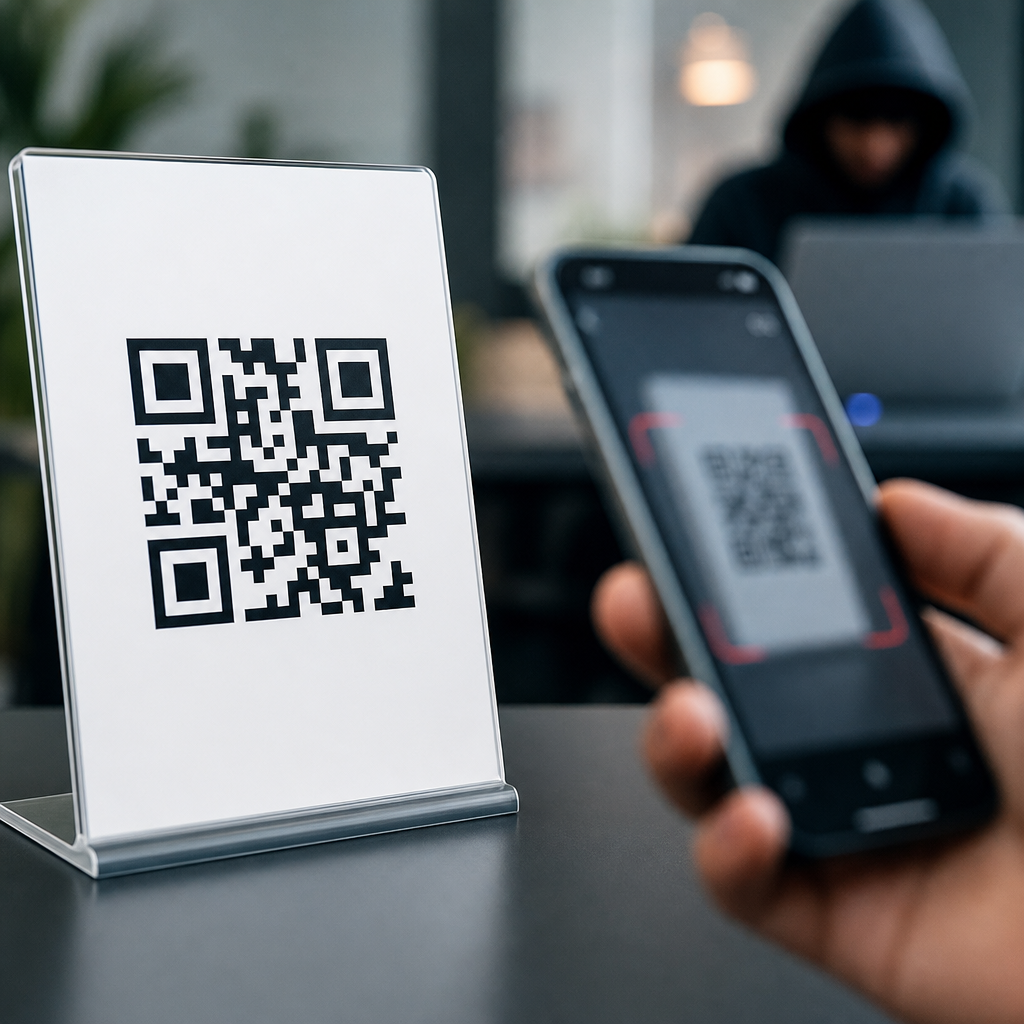
QR codes can be abused, but the code itself is not usually “hacked” in the way people imagine. A QR code is simply a machine-readable pattern that stores data, most often a URL, payment request, Wi-Fi credential, contact card, or app action. The real risk comes from what happens after a phone scans it. In my work reviewing campaigns, restaurant menus, payment posters, product packaging, and event signage, I have found that most QR code security problems are caused by deceptive destinations, weak operational controls, and misplaced trust, not by some secret flaw in the black-and-white squares. That distinction matters because it changes how businesses and consumers should protect themselves.
This topic sits at the center of QR code myths and misconceptions. Many people assume QR codes are either completely safe because they are common, or inherently dangerous because they hide information from human eyes. Both views are incomplete. A printed code can link to a phishing page. A sticker can be placed over a legitimate parking meter code. A dynamic code can be edited by an account holder after printing. Yet a static code on verified packaging can be a practical, low-risk tool when it points to a trusted domain and is governed properly. The right question is not “Can QR codes be hacked?” but “How can QR codes be misused, and what controls reduce that risk?”
Understanding the answer matters for consumers, marketers, retailers, schools, healthcare teams, and operations staff. QR codes now support menus, payments, check-ins, authentication flows, customer support, app downloads, inventory labels, warranty registration, and product authentication. As adoption has grown, so have scams such as quishing, a phishing technique that uses QR codes to route victims to fake login pages or malicious payment screens. Security agencies including the FBI and cybersecurity vendors have warned about fraudulent QR codes in public spaces and emails. If your organization publishes QR codes or your customers scan them, you need practical guidance grounded in real use cases, not fear or guesswork. This hub explains the core risks, clarifies common myths, and shows what safe deployment actually looks like.
What QR codes can and cannot do
A QR code does not magically break into a phone. By itself, it stores encoded information. Most smartphone cameras decode that information and present an action, such as opening a web page, adding a contact, joining a Wi-Fi network, composing an email, or initiating a payment flow. On modern iPhone and Android devices, the operating system usually shows a preview prompt before completing the action. That prompt is an important security checkpoint. It means the scan alone is not normally the point of compromise; the user’s next tap, combined with the trustworthiness of the destination, is what determines risk.
That is why saying “QR codes are malware” is inaccurate. A QR code can send a user to a site that attempts credential theft, social engineering, or malware delivery, but the code itself is a carrier, not the payload. The closest analog is a shortened link printed on paper. Because humans cannot visually inspect encoded data, attackers use QR codes to hide suspicious destinations. This obscurity is useful to scammers, especially in locations where people expect to scan quickly, such as parking kiosks, transit stations, hotel lobbies, and tabletop menus. Still, obscurity is not exploitation. The actual attack typically relies on a fake page, a counterfeit payment request, or a manipulated account behind a legitimate dynamic QR platform.
Another misconception is that every QR code is editable after printing. That is only true for dynamic QR codes. A static QR code directly contains the final destination. Once printed, it cannot be changed unless someone physically replaces it or covers it with another label. A dynamic QR code contains a short redirect URL managed through a platform. The destination can be updated later for analytics, campaign rotation, or error correction. This is useful for marketers, but it introduces account-security and governance concerns. If a dynamic QR platform account is compromised, attackers may redirect traffic without touching the printed code. For that reason, QR security includes not just physical inspection, but access control, audit logs, and redirect governance.
How QR code attacks happen in the real world
The most common QR scam is sticker replacement. An attacker prints a malicious code and places it over a legitimate one on a parking meter, donation sign, restaurant table tent, or public notice. Victims scan, see a plausible payment or login page, and enter card details or credentials. I have seen this attack succeed because people assume a physical sign in a trusted location must be authentic. In reality, any unattended surface is vulnerable. Parking payment scams are especially effective because users are already expecting urgency, fees, and mobile checkout. The defense is straightforward: inspect for tampering, verify the web domain before paying, and prefer official apps or manually typed addresses when available.
Email-based quishing is another growing pattern. Instead of embedding a clickable link that email security tools can easily rewrite or analyze, attackers place a QR code in the message and urge the recipient to scan with a personal phone. The message may claim password expiration, multi-factor authentication reset, package delivery, HR document review, or voicemail access. This tactic bypasses some desktop habits because the scan shifts the action to a mobile device outside normal browser protections. Security teams now train employees to treat QR codes in email like any other unsolicited link. If a workflow is legitimate, users should navigate to the service directly through a bookmarked or known address rather than scanning from the message.
Attackers also abuse dynamic redirect chains. A printed QR code may lead to a reputable QR management domain, which then redirects to the destination page. Users see the intermediary domain first and assume the link is safe. If the final redirect target changes later, the scan experience changes without any visible modification to the printed code. This is not a flaw in QR technology; it is a governance issue. Redirects should be tightly controlled, limited to approved domains, and monitored for sudden destination changes. Short-link and redirect hygiene matters here just as much as it does in email marketing or paid search landing pages.
| Myth | Reality | Practical implication |
|---|---|---|
| QR codes hack phones instantly | Most scans only decode data and prompt an action | Risk usually appears after opening the destination |
| All QR codes are editable after printing | Only dynamic codes can change remotely | Use account security and redirect controls for dynamic campaigns |
| QR codes are safer than links because they are physical | Physical placement can create false trust | Inspect for tampering and verify the domain before acting |
| A branded landing page proves authenticity | Fake pages can copy logos, colors, and layout | Check the full URL, certificate, and payment flow |
| Blocking QR codes solves the problem | QR is a delivery method, not the root cause | Focus on phishing defense, mobile security, and user education |
Common myths and misconceptions about QR code security
One persistent myth is that legitimate-looking design equals legitimacy. Businesses often add logos in the center of a QR code, use brand colors, or print the code on expensive materials. None of that guarantees safety. Fraudulent codes can imitate visual branding, and counterfeit packaging can look convincing. Verification must happen at the destination layer: domain name, certificate, account identity, and payment processor details. If the code claims to belong to a bank, utility, retailer, or government office, the linked domain should clearly match that organization’s official web property.
Another misconception is that HTTPS alone makes a QR destination trustworthy. HTTPS confirms that the connection between the browser and the site is encrypted and that the site controls the certificate for that domain. It does not prove that the site is the organization you expect. Attackers routinely register deceptive lookalike domains that support HTTPS. For example, a page might use a misspelled brand name, extra words, or a suspicious country-code top-level domain. Users should read the domain carefully, especially before entering credentials, approving a payment, or downloading an app. Encryption is necessary, but identity verification is what stops phishing.
People also assume that app-store QR codes are always safe because the final destination is Apple App Store or Google Play. In many campaigns that is true, but the path to the store may still pass through a redirect controlled by a third party. If that redirect is compromised, users can be sent somewhere else first. The safer pattern is to display the app name, developer name, and official website near the code so users can cross-check the listing. This is especially important for cryptocurrency wallets, payment tools, remote support utilities, and productivity apps, where fake clones have historically targeted users.
Security best practices for consumers and businesses
For consumers, the first rule is simple: pause before you scan, and pause again before you tap. Check whether the code appears to be an added sticker, whether the surrounding sign looks altered, and whether the request makes sense in context. After scanning, review the preview URL. If the domain is unfamiliar, misspelled, shortened without explanation, or unrelated to the brand on the sign, do not proceed. Avoid entering passwords after reaching a site through a QR code unless you independently verified the address. For payments, official apps are usually safer than ad hoc web forms reached through public signage.
For businesses, secure QR code deployment starts with ownership and inventory. Maintain a register of every public-facing QR code, where it is placed, what it should resolve to, who owns it, and whether it is static or dynamic. Use enterprise password management, multi-factor authentication, and role-based access for any dynamic QR platform. If the platform supports domain allowlists, change approval workflows, and scan analytics, enable them. I recommend periodic physical inspections for high-traffic locations and a simple tamper-evident design strategy, such as integrating the code into permanent print rather than relying on detachable stickers.
Destination design matters too. The landing page should clearly identify the organization, explain why the user was sent there, and avoid unnecessary data collection. For payments, display the merchant name, amount logic, refund policy, and support contact. For login-related flows, avoid requesting credentials unless the destination is your primary authenticated domain or a well-understood identity provider. If your QR code supports Wi-Fi onboarding, configure guest-network isolation and clear naming. If it opens a PDF, consider using a preview page first so users understand what they are downloading. Good user experience reduces the chance that cautious people abandon the process, while clear identity signals reduce the chance that impulsive people get fooled.
How to build trust into QR code programs
Trustworthy QR code programs combine technical controls, content standards, and user education. The strongest pattern is to link codes only to domains your audience already knows, ideally under a single primary brand domain rather than a patchwork of shorteners and campaign microsites. If you need dynamic routing, use descriptive paths and keep redirects transparent. A branded subdomain can help, but consistency matters more than novelty. When I audit QR journeys, the programs with the fewest support tickets are the ones that make the destination obvious before the scan and unmistakable after the scan.
Measurement should support security, not undermine it. Analytics are one reason teams choose dynamic QR codes, yet tracking parameters, third-party redirects, and layered attribution can produce long, confusing URLs that look suspicious. Balance insight with clarity. Server logs, UTM governance, and first-party analytics can often provide enough reporting without making the user journey opaque. Pair this with customer-facing guidance: include a nearby plain-text URL, a support number, or brief instructions such as “Official site only: brand.com/pay.” That small addition gives cautious users an alternative and makes fraudulent copies easier to spot.
Finally, treat QR codes as part of a broader phishing and fraud prevention program. Include them in awareness training, vendor reviews, incident response playbooks, and location audits. If a scam is reported, rotate dynamic destinations, alert affected users, inspect physical placements, and coordinate with payment providers or hosting services quickly. QR codes are not uniquely dangerous, but they compress trust, convenience, and hidden data into a single scan. Organizations that recognize that tradeoff can use them safely and effectively. If you publish or rely on QR codes, review your inventory, tighten your controls, and make verification easy for every user.
Frequently Asked Questions
Can a QR code itself be hacked?
Usually, no. A QR code is not “hacked” in the way people often picture a website, phone, or software system being hacked. A QR code is simply a visual method of storing data in a machine-readable format. In most cases, that data is a URL, but it can also contain a payment request, Wi-Fi login details, contact information, calendar data, or instructions that trigger a specific app action. The image itself does not execute malware just because it is scanned. The real security issue is what the QR code points to or what action it tells a device to perform after the scan.
That distinction matters. When people say a QR code was “hacked,” what often happened is one of three things: the destination linked by the code was malicious, the code was replaced with a fraudulent one, or the system behind the QR code campaign was poorly secured. For example, a legitimate payment poster might be covered with a sticker that sends users to a scam payment page. A restaurant menu QR code might lead to a cloned website designed to collect customer data. A dynamic QR code platform could also be compromised if the account controlling the redirect is weakly protected. In all of these cases, the QR code is just the delivery mechanism. The danger comes from deception, redirection, and weak controls around the experience connected to the code.
What are the biggest security risks when scanning a QR code?
The biggest risks are phishing, payment fraud, malicious redirects, and data exposure. Because QR codes are designed to remove friction, people often scan first and think later. That makes them effective tools for social engineering. A scammer can place a fake QR code on a parking meter, event sign, tabletop menu, flyer, product insert, or package label and redirect the user to a convincing but fraudulent page. If the page looks legitimate, many users will enter payment details, email addresses, login credentials, or personal information without verifying where they actually landed.
Another common risk involves dynamic QR codes that rely on redirect services. These are often useful for marketing because the destination can be updated without reprinting the code, but they also introduce dependency on the security of the redirect platform and the account managing it. If the account is poorly protected or the redirect settings are mismanaged, the code may unexpectedly begin sending users somewhere untrustworthy. There are also privacy concerns. Some QR campaigns log scan time, location, device type, and behavior after the click. That does not automatically make them unsafe, but it does mean users may be sharing more information than they realize. In short, the highest-risk moment is not the scan itself but the trust decision that follows it.
How do criminals use QR codes in scams?
Criminals use QR codes because they are easy to deploy, easy to disguise, and often trusted by users. One of the most common tactics is code replacement. A fraudster prints a sticker with a malicious QR code and places it over a legitimate one on a payment sign, parking kiosk, menu stand, or public poster. To the average person, the code looks normal. Once scanned, it leads to a fake checkout page, a spoofed login form, or a malware-laced download prompt. The victim often assumes the scam is legitimate because the physical environment appears trustworthy.
Scammers also use QR codes in email and text phishing campaigns, sometimes called “quishing.” Instead of placing a suspicious link directly in the message, they include a QR code and urge the recipient to scan it with a phone. This can bypass some user skepticism and, in some cases, avoid basic link inspection habits. The destination may imitate a bank, Microsoft 365 login page, parcel delivery update, or payroll portal. In business settings, attackers may use QR codes to trick employees into entering credentials on fake single sign-on pages. In consumer settings, they may mimic account verification, discount redemption, invoice payment, or event ticket confirmation. The success of these scams depends less on technical sophistication and more on urgency, familiarity, and the assumption that a scannable code in a normal-looking context must be safe.
How can you tell whether a QR code is safe before scanning or using it?
You usually cannot judge a QR code’s safety just by looking at the pattern itself, which is why context matters so much. Start by asking whether the code appears where you would reasonably expect it and whether the surrounding material looks tampered with. A crooked sticker, mismatched branding, poor print quality, or a code placed over an existing label are all warning signs. Public payment stations, flyers, street posters, and unattended signage deserve extra caution because they are easy targets for substitution. If a QR code asks you to make a payment, sign in, download an app, or provide sensitive information, that should raise your level of scrutiny immediately.
After scanning, check the preview carefully before tapping through. Many phones display the destination URL before opening it. Look for misspellings, odd subdomains, shortened links, or domains that imitate real brands. For example, a page that looks like a bank login but uses a strange domain should be treated as suspicious. It is often safer to navigate directly to the official website or app instead of continuing from the QR code. If the scan triggers a payment request, verify the recipient details. If it opens a Wi-Fi connection prompt, confirm the network name with the venue. If it prompts an app download, use the official app store rather than installing from an unknown source. A QR code can be part of a legitimate workflow, but it should never replace basic verification.
What should businesses do to make QR code campaigns more secure?
Businesses should treat QR codes as part of a broader trust and security system, not just as a print asset. The first priority is destination control. If a code points to a web page, that page should be hosted on a domain the business clearly owns and maintains. Avoid vague redirects when possible, and if dynamic QR codes are necessary, secure the platform account with strong passwords, multi-factor authentication, role-based access, and careful change management. Teams should know who owns the code, who can edit the destination, and how updates are logged. Weak account security behind dynamic QR code systems is one of the most overlooked operational risks.
Physical integrity matters too. Codes on menus, packaging, payment posters, and event signs should be checked regularly for tampering. Use print designs that make sticker overlays easier to detect, and place branding or human-readable URLs nearby so users can verify where the code should lead. For payment use cases, display the merchant name, official domain, and support contact clearly. On the destination page, keep branding consistent and avoid asking for unnecessary information. If a scan leads to login or payment, use HTTPS, recognizable domain names, and fraud monitoring. Finally, educate both staff and customers. Employees should know how to spot suspicious replacements and how to respond if a code has been altered. Customers should be encouraged to verify domains and report anything unusual. The safest QR code campaign is one built with secure infrastructure, visible trust signals, and regular monitoring from end to end.





