
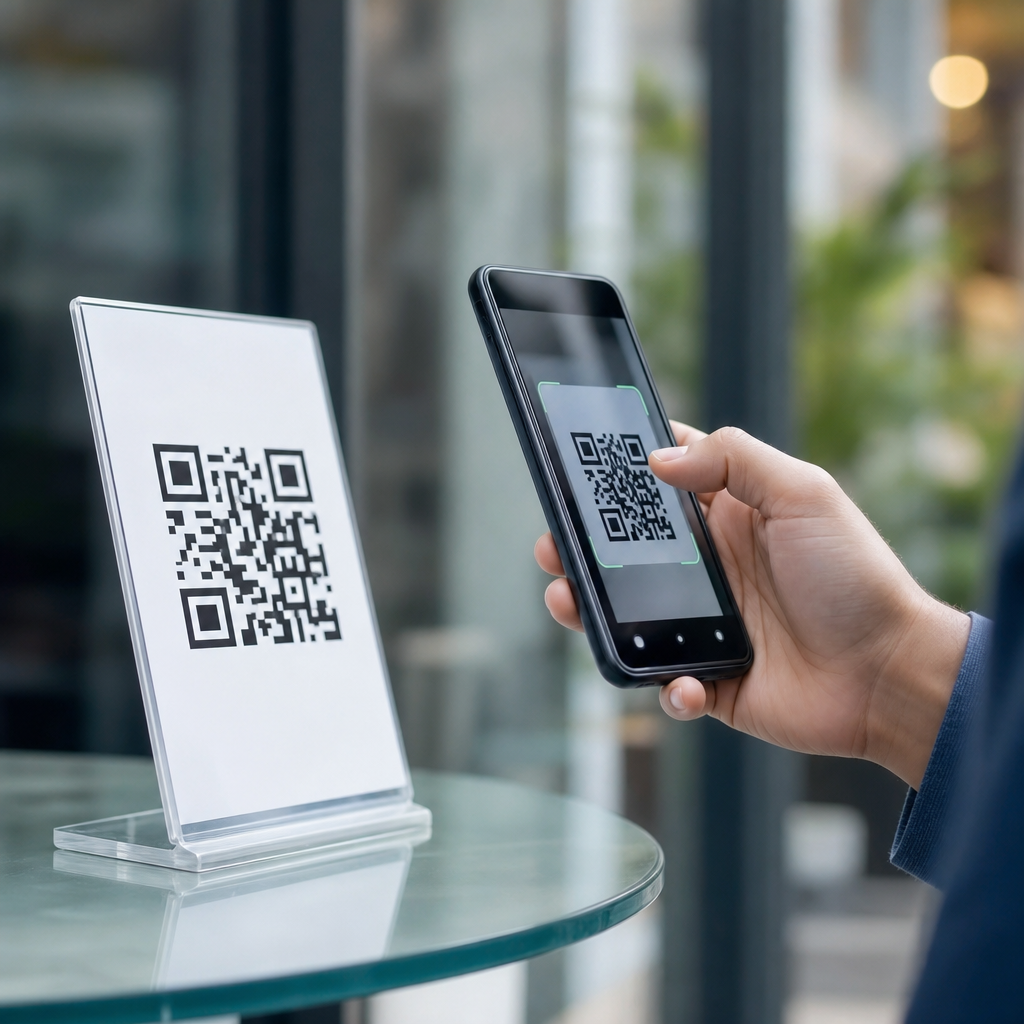
QR codes are convenient, fast, and now nearly everywhere, but many people still ask the same practical question: how to know if a QR code is safe to scan. The short answer is that a QR code itself is just a machine-readable pattern, yet the destination it opens can be harmless, misleading, or outright malicious. Understanding that difference is the starting point for better QR code security, smarter privacy decisions, and safer everyday use.
A QR code, short for Quick Response code, stores information such as a website URL, contact details, payment data, Wi-Fi credentials, or a prompt to open an app. Businesses use them on menus, packaging, tickets, posters, invoices, and support materials because they reduce typing and move users quickly from an offline surface to an online action. That convenience is exactly why attackers use them too. In security work, this is often called QR phishing or “quishing”: the code hides a destination that a person cannot evaluate until after scanning.
I have seen this risk play out in ordinary settings rather than dramatic hacker scenarios. A fake sticker placed over a restaurant payment code can send a customer to a copycat checkout page. A poster in a transit station can be replaced with one that collects login credentials. A code in an email attachment can route a user past email filters and into a credential theft flow on a mobile browser. Because scanning feels routine, people often lower their guard precisely when they should slow down.
That is why the question “Are QR codes safe?” needs a precise answer. QR codes are conditionally safe. The safety depends on where the code came from, whether it appears tampered with, what action it requests, how the scanning device previews the destination, and whether the landing page behaves like a trustworthy site. This article is the hub for QR code security, privacy, and compliance topics, so it covers the full decision process: physical inspection, link verification, payment caution, mobile device protections, business controls, and legal considerations around data collection.
If you learn one principle, make it this: never treat a QR code as trustworthy just because it appears in a public place or on a professional-looking sign. Trust comes from source verification and destination checking, not from the code’s appearance. Once that principle becomes habit, scanning becomes much safer without giving up the usefulness that made QR codes popular in the first place.
What Makes a QR Code Risky or Safe
A QR code is safe when it leads to an expected, verified action from a trusted source and does not ask for more information or permissions than necessary. It becomes risky when it obscures a destination, triggers an unexpected download, initiates payment without strong verification, or asks for passwords, card data, one-time codes, or device permissions on a page you did not intentionally visit. The security issue is not the black-and-white square itself. The risk sits in the destination and the action chain that follows.
In practice, safe QR code use comes down to context and intent. A code printed inside sealed product packaging by a known manufacturer is generally lower risk than a code on a bus-stop poster covered with overlapping stickers. A code displayed inside your bank’s authenticated mobile app is lower risk than one sent by text message claiming your account is locked. Attackers rely on urgency, curiosity, and convenience. They want the scan to feel normal enough that you skip verification.
It also helps to separate technical risk from privacy risk. A technically safe code may still collect more data than you expect, such as device type, location, campaign attribution, or browsing behavior after the click. Marketers commonly use dynamic QR code platforms to change destinations, measure scans, and segment traffic. That is not automatically dangerous, but it means a code can be safe from malware while still raising privacy questions. Good judgment considers both.
How to Check a QR Code Before You Scan
The safest scan starts before your camera opens. First, consider the source. Is the code from a business, institution, colleague, or product you already trust? Was it delivered through an official channel? If a code appears in an unexpected email, random text, social media message, or printed sticker in a public place, treat it as untrusted until verified. Source validation eliminates many scams before any technical check is needed.
Next, inspect the physical code. Look for tampering: stickers placed over original labels, mismatched branding, crooked placement, blurred printing, or a payment code attached in an odd location. I have advised organizations to audit lobbies, retail counters, parking meters, and event signage because replacement stickers are one of the simplest fraud methods. If a payment QR code is legitimate, staff should be able to confirm where it belongs and what destination it should open.
Then use a scanner that shows a preview before opening the destination. Both iPhone and Android devices typically display the URL or app action before launch. That preview matters. Read the domain carefully. Fraud often hides in look-alike domains such as payrnents-example.com instead of payments-example.com, extra words like secure-verify-login.example.net, or odd country-code domains unrelated to the brand. If the preview is shortened or obscured, do not proceed until you know the final destination.
| Checkpoint | Safer Sign | Warning Sign |
|---|---|---|
| Source | Official business, known contact, verified packaging | Unexpected message, random poster, anonymous sticker |
| Physical condition | Clean print, consistent branding, fixed placement | Overlay sticker, peeling label, mismatched design |
| Previewed URL | Exact brand domain with HTTPS | Misspelling, shortened link, unrelated domain |
| Requested action | Expected menu, ticket, product info, login you initiated | Password reset, urgent payment, app sideload, code entry |
| Landing page behavior | Professional site, normal navigation, clear privacy terms | Pop-ups, forced download, credential prompts, broken pages |
Finally, ask whether the requested action makes sense. If a QR code on a parking meter sends you to a personal payment handle, stop. If a restaurant menu code immediately asks for your email and card details, question it. Safe QR interactions are usually narrow and predictable. The more a scan tries to rush you into entering sensitive data, the less safe it is.
Common QR Code Scams and Red Flags
The most common QR code scam is credential phishing. The code opens a page that looks like Microsoft 365, Google, a bank, or a delivery carrier and asks you to sign in. I have seen these campaigns bypass user skepticism because people are accustomed to using phones for quick authentication tasks. Once the victim enters credentials, the attacker captures them and often asks for a multi-factor code immediately. Any QR code that leads to a login page you did not intentionally seek out deserves extra scrutiny.
Payment fraud is another frequent pattern. Criminals replace a legitimate merchant’s QR code with one linked to their own payment destination. This is especially effective in parking, vending, charity collection, and small retail settings where customers expect to pay quickly. Warning signs include names that do not match the merchant, payment requests through peer-to-peer apps when a formal business checkout is expected, or pages without receipts, tax details, or support information.
Malicious downloads are less common than phishing but still important. A QR code may push a user toward an unofficial app store, a direct APK download, or a browser prompt claiming the device is outdated. On modern mobile platforms, app sandboxing reduces some impact, but users can still be tricked into installing remote-access tools, spyware, or ad fraud applications. Legitimate organizations do not distribute critical mobile apps through random QR codes on public posters.
There are also softer red flags that matter: urgent language, prizes that require scanning, requests to “re-verify” an account, and pages that hide contact details or company identity. Scammers depend on compressed decision-making. Slowing the process by ten seconds to read the domain, examine the page, and ask whether the action is expected prevents many incidents.
How to Verify the Website After Scanning
Even if the QR code passes initial checks, the landing page still needs verification. Start with the domain name, not just the logo. A convincing logo is trivial to copy; the registered domain is harder to fake convincingly. Look for the exact company name in the domain, normal spelling, and a secure HTTPS connection. HTTPS alone does not prove legitimacy, but the absence of it is a clear reason to leave.
Review the page structure. Trusted websites usually provide navigation, customer support information, terms, privacy notices, and consistent branding across multiple pages. Scam pages often focus on one action only: sign in, pay now, or enter a one-time code. If the page looks isolated, poorly formatted, or stripped down compared with the real company site, open a separate browser tab and navigate to the official website manually rather than continuing from the QR code.
For higher-risk actions, verify independently. If the code claims to be from your bank, close the page and use the bank’s official app or a saved bookmark. If it points to a software download, visit the publisher’s site directly through search or a known URL. Security teams call this out-of-band verification, and it is one of the most reliable defenses because it breaks the attacker’s controlled path.
Privacy, Tracking, and Data Collection Concerns
QR code safety is not only about avoiding scams. It is also about understanding what data a scan shares. Many businesses use dynamic QR code services that log scan time, approximate location, operating system, device type, referral context, and conversion events. In campaigns, those details help measure performance. In privacy terms, they can create profiles that users never realized they were contributing to.
When I review QR-based customer journeys, I look for proportionality. Does a simple menu scan really need account creation? Does a product registration code explain what data will be stored and for how long? Is consent clear before marketing communications begin? In many jurisdictions, privacy rules require transparency, purpose limitation, and a lawful basis for personal data processing. A QR code that silently redirects through several tracking domains may be legitimate from a security standpoint yet still be poor privacy practice.
Users can protect themselves by limiting unnecessary submissions, preferring guest access where available, and reading the first lines of privacy disclosures before entering personal data. Businesses should minimize data collection, publish clear notices, and avoid using QR codes to pressure users into broad consent unrelated to the immediate service.
Best Practices for Businesses Using QR Codes
Organizations that deploy QR codes have a responsibility to make them safe and auditable. Use short, human-readable destination URLs where possible, host critical flows on your primary domain, and avoid unnecessary redirects. Print codes with clear labels stating the expected destination, such as “Opens example.com/menu.” That single line improves trust and gives users a reference point before they scan.
Protect physical placements. Inspect high-traffic codes regularly, especially for payments, check-in desks, parking, and event materials. Tamper-evident labels, controlled signage, and staff training reduce sticker replacement fraud. For dynamic QR campaigns, maintain change logs and access controls so only authorized staff can edit destinations. I strongly recommend using role-based permissions and monitoring through established platforms rather than sharing a single login among marketers, vendors, and store teams.
For regulated environments, treat QR workflows like any other digital touchpoint. Review data flows, retention, consent language, and vendor contracts. Test the user journey on both iOS and Android. Confirm that the page loads correctly, uses TLS, and does not request excessive permissions. When businesses build predictable, transparent QR experiences, users learn what normal looks like, which makes scams easier to spot elsewhere.
What to Do If You Scanned a Suspicious QR Code
If you scanned a suspicious QR code but did not interact further, close the page and clear the browser tab. If you entered credentials, reset the password immediately from the official site or app, revoke active sessions if the service allows it, and change reused passwords on other accounts. If you entered a one-time authentication code, contact the provider at once because the attacker may already be attempting access.
If payment information was submitted, call the card issuer or payment provider, report the transaction, and monitor statements. If you installed an app, remove it, run a mobile security scan from a reputable tool, and review device permissions for anything unusual such as accessibility access, device admin rights, or SMS permissions. In workplace settings, report the incident to IT or security quickly; early reporting can stop broader compromise.
Most importantly, document where the code appeared. A photo of the sign, poster, invoice, or message can help the affected business remove a fraudulent code and protect others. Fast reporting turns an individual near miss into a useful security signal.
QR codes are safe when people and businesses treat them as gateways that deserve verification, not as harmless images. Check the source, inspect for tampering, preview the URL, verify the domain, and be skeptical of urgent logins or payments. Remember that safety includes privacy too: even legitimate codes can collect more data than expected, so share information deliberately and favor official channels for sensitive actions.
For organizations, the lesson is equally clear. Secure QR code use is not just a design choice; it is an operational discipline involving trusted domains, physical inspections, controlled redirects, privacy disclosures, and staff awareness. For individuals, a few simple habits dramatically reduce risk without giving up convenience. Slow down, inspect, and verify before you tap.
If you manage QR codes or scan them regularly, use this guide as your baseline checklist and apply it consistently. That routine is the simplest way to answer the question “Are QR codes safe?” with a practical yes—when handled carefully, they can be.
Frequently Asked Questions
Is a QR code itself dangerous, or is the risk in where it takes you?
A QR code by itself is not usually the dangerous part. It is simply a machine-readable pattern that stores information such as a website address, contact details, login prompt, payment link, Wi-Fi credentials, or app action. The real risk comes from the destination or instruction embedded in the code. In other words, a QR code is like a shortcut: it can lead to a legitimate business page, or it can send you to a fake website designed to steal passwords, payment information, or personal data.
This distinction matters because many people assume the black-and-white square itself can somehow infect a phone just by being scanned. In most cases, the harm happens only after the scan triggers an action and the user continues by opening a link, submitting information, downloading a file, or approving a payment. That is why safe QR code use is less about fearing the symbol and more about verifying what happens next. If your phone shows a preview of the destination, check it carefully before tapping. A familiar domain name, secure connection, and reasonable purpose are all good signs. A misspelled website, strange URL shortener, or unexpected request for sensitive data is a warning sign.
What are the biggest signs that a QR code might not be safe to scan?
One of the clearest warning signs is context that feels off. If a QR code appears in an unexpected place, covers another code on a public sign, or is attached with a sticker that looks recently placed, treat it with caution. Criminals sometimes replace legitimate codes in restaurants, parking meters, posters, payment terminals, or package inserts with fake ones that redirect users to scam pages. A code that looks tampered with, poorly printed, or out of place deserves a second look before you scan.
Another major red flag is what appears after the scan. If the previewed link uses a suspicious domain, contains random strings of characters, imitates a trusted brand with slight misspellings, or pushes you to act urgently, stop there. Be especially careful if the page asks for login credentials, credit card details, one-time passwords, banking information, cryptocurrency transfers, or app downloads. Legitimate companies rarely force sensitive actions through a random QR code without giving users another way to verify the request. The safest habit is to pause, read the URL, and ask whether the destination makes sense for the situation. If you are unsure, go to the company’s website manually instead of using the code.
How can you check a QR code safely before opening the link?
The safest approach is to use a scanner or phone camera that shows a link preview before opening anything. Many modern smartphones do this automatically, allowing you to inspect the destination URL first. Take a moment to read the full domain, not just the first few characters. For example, a trusted company might use its real domain name, while a scam site could use a lookalike such as extra words, swapped letters, or a different ending. If the code leads to a shortened URL, that does not automatically mean it is malicious, but it does reduce transparency, so extra caution is wise.
You can also cross-check the code using common-sense verification. Ask yourself where the code came from, why it is there, and whether the action it requests is reasonable. If it claims to be from your bank, shipping provider, employer, or a government service, do not rely on the QR code alone. Open the official app or type the known website address manually. For higher-risk situations, such as making a payment or entering private information, you can use a URL inspection service or security app to evaluate the link before visiting it. Keeping your phone’s operating system and browser updated also helps, because many updates include protections against known malicious websites.
Can scanning a QR code install malware or steal your information automatically?
In most everyday cases, scanning a QR code does not instantly infect your device just from reading the code. Usually, the scan reveals data and then asks you to take the next step, such as opening a website or joining a network. However, that next step can absolutely lead to trouble if you continue without checking. A malicious page may try to trick you into downloading an unsafe app, entering your password into a fake login form, approving a payment, or granting permissions you would not normally allow. So while the scan itself is often just the beginning, the outcome can still be serious if the destination is malicious.
There are also some QR codes that trigger actions other than opening a website, such as adding a contact, composing a message, connecting to Wi-Fi, or launching another app. These are not automatically harmful, but they can be abused in deceptive ways. For example, a code might try to connect you to a rogue network or prefill a text message to a premium number. That is why it is important to review any prompted action carefully before approving it. As a general rule, never install software, enter credentials, or authorize payments just because a QR code led you there. Verification should always come first.
What are the best everyday habits for using QR codes safely in public?
Start with simple caution and awareness. Scan QR codes only when you trust the source or can verify the context. In public places, inspect the code physically if possible. Look for signs of tampering, replacement stickers, or sloppy placement over an original label. If a code is being used for payments, menus, parking, event entry, or product information, compare it with surrounding branding and instructions. If anything looks inconsistent, ask a staff member or use the organization’s official website or app instead. Public convenience is exactly what makes QR codes useful, but it is also what makes them attractive for scams.
Beyond that, build a few strong security habits into your routine. Keep your phone updated, use built-in browser protections, and avoid giving sensitive information to sites opened from unknown QR codes. Prefer official apps or manually typed web addresses for banking, healthcare, account logins, and purchases. Be cautious with codes sent through unsolicited emails, text messages, social media posts, or printed notices that create urgency. If you do scan something questionable, close the page immediately and do not interact further. And if you already entered personal or financial information, change affected passwords, contact the relevant institution, and monitor accounts for suspicious activity. Safe QR code use is really about slowing down for a few seconds and treating the destination with the same scrutiny you would give any unfamiliar link.





