
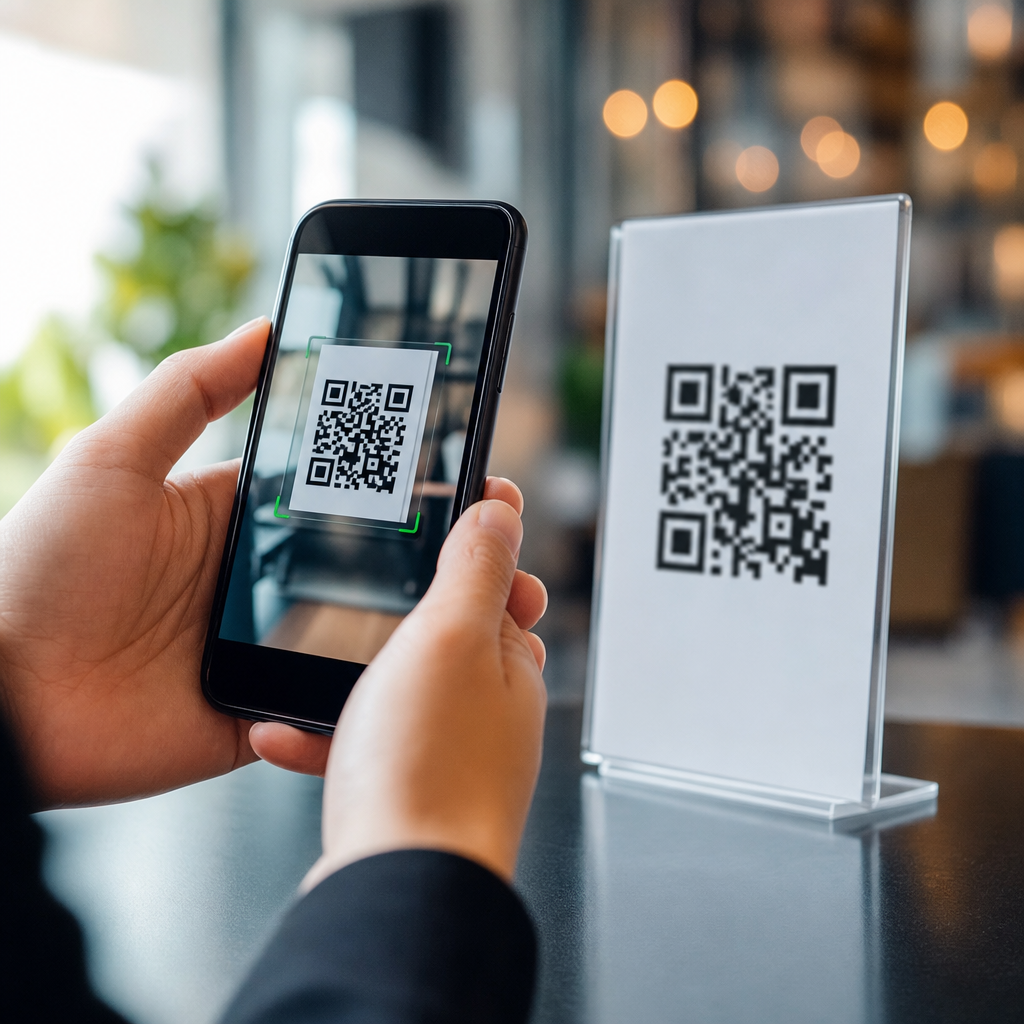
QR codes work almost instantly because the full process, from camera detection to decoded action, usually takes only a fraction of a second when the code is well designed, well lit, and linked to a fast destination. In practical terms, most people experience a successful scan as “point, focus, open,” yet several technical steps happen in sequence. A QR code is a two-dimensional matrix barcode made of black and white modules arranged on a square grid. Unlike a traditional one-dimensional barcode that stores data across a single line, a QR code stores information both horizontally and vertically, allowing higher capacity and faster detection from many angles. That combination is why QR codes became standard for payments, menus, packaging, tickets, logistics labels, and industrial workflows. When clients ask me how fast QR codes work, they usually mean one of three things: how quickly a phone camera recognizes the symbol, how rapidly the encoded data is decoded, or how long it takes to reach the final content after the scan.
Those are related but different speed layers. Recognition speed depends on camera quality, autofocus performance, contrast, code size, print quality, glare, and distance. Decoding speed depends on symbol complexity, error correction level, version size, and whether the app must process a damaged or distorted image. Destination speed depends on what the code contains. A static QR code that stores plain text, Wi-Fi credentials, or a short URL can resolve immediately because the code itself already contains the needed data. A dynamic QR code usually points to a short redirect URL managed by a QR platform, which then forwards the user to the current landing page, PDF, app store listing, or form. That redirect adds flexibility and tracking, but it also adds one more network request. The added delay is usually tiny, measured in milliseconds on a healthy connection, yet it matters when teams optimize scan performance at scale. Understanding these layers helps businesses create faster user experiences and avoid blaming the code for delays caused by weak mobile networks or heavy web pages.
The speed question matters because QR performance directly affects conversion, completion rates, and trust. If a code scans immediately, users perceive the experience as reliable. If scanning stalls, they assume the code is broken, the brand is careless, or the destination is unsafe. In retail, a slow payment scan can create checkout friction. In restaurants, a menu code that opens a bloated page can frustrate guests before they order. In manufacturing and warehousing, slow scan throughput can reduce operational efficiency when workers repeat scans hundreds of times per shift. In healthcare, specimen tracking and patient identification depend on rapid and accurate barcode capture under nonideal conditions. That is why ISO/IEC standards for QR code symbology, camera-based scanning best practices, and print verification methods all focus on readability under real-world constraints. To explain how fast QR codes work, it helps to break the process into the actual stages a device follows and then examine the practical factors that speed up or slow down each stage.
How a QR code is detected, decoded, and opened
A QR code scan begins with image capture. The camera preview streams frames continuously, and the scanning software searches each frame for the three large finder patterns located at three corners of the symbol. These patterns allow rapid identification regardless of rotation, which is one reason QR codes feel faster than older codes that require stricter alignment. Once the finder patterns are detected, the software estimates perspective, identifies the fourth alignment geometry, and samples the grid of modules. It then reads format information, including error correction settings and mask pattern, unmasks the data, applies Reed-Solomon error correction, and reconstructs the encoded content. On a modern smartphone using native camera software from Apple or Google, all of that typically happens in real time, often within a few preview frames. Under good conditions, recognition and decoding can occur in roughly 100 to 500 milliseconds.
After decoding, the device decides what to do with the content. If the QR code contains plain text, a contact card, or Wi-Fi credentials, the phone can present the result immediately without loading a website. If it contains a URL, the system may show a notification banner first or open the browser directly, depending on device settings and app behavior. This final stage often dominates the user’s perception of speed. I have tested QR codes that scan perfectly in under a second but still feel slow because the destination page takes three seconds to render. That difference is important for businesses building campaigns. The symbol itself is rarely the bottleneck. More often, the lag comes from mobile network latency, excessive JavaScript, large hero images, slow redirects, or analytics scripts firing before content appears. In other words, scan speed and destination speed are connected, but they are not the same problem.
What makes one QR code scan faster than another
The fastest QR codes are simple, high contrast, appropriately sized, and placed in conditions that support quick camera focus. Simplicity matters because larger data payloads require more modules, and denser symbols are harder to resolve from a distance or on lower quality cameras. A short URL usually scans faster than a long block of text because it allows a lower symbol version with fewer modules. Contrast matters because the decoder needs a clear difference between dark and light modules. Black on white remains the most reliable option. Reverse codes, low-contrast brand colors, gradients, glossy finishes, and transparent overlays all reduce scan consistency. Size matters because the camera must resolve individual modules cleanly. A common field rule is to start with at least a 10:1 ratio between viewing distance and code width, then test the actual placement. A code viewed from one meter away should generally be around 10 centimeters wide or larger.
Error correction also affects speed. QR codes support four levels: L, M, Q, and H, allowing recovery of approximately 7 percent, 15 percent, 25 percent, and 30 percent of damaged codewords. Higher error correction improves resilience when a logo obscures part of the symbol or when the print may be scratched, but it also increases density. In many marketing cases, level M or Q offers a sensible balance. Overdesign is a common cause of poor performance. I regularly see branded codes with oversized logos, decorative corners, insufficient quiet zones, or custom shapes that force cameras to work harder. The quiet zone, the blank margin around the code, is especially important. Without enough white space, the software may struggle to separate the symbol from the background. ISO guidance and major generator tools treat the quiet zone as mandatory, not optional. If you want a fast scan, preserve the geometry before adding visual flair.
How environment and device quality affect QR code speed
Environment can change scan time more than code design alone. Low light reduces shutter speed and increases image noise, making module edges harder to identify. Glare from laminated menus, curved bottles, shop windows, and glossy posters can obscure finder patterns. Motion blur matters in event entry lines, warehouse aisles, and drive-through pickup lanes where users are moving while scanning. Distance and angle also matter. A code that scans instantly at arm’s length may fail across a storefront window if the print is too small. Camera quality is the other half of the equation. Newer phones with better sensors, image signal processors, autofocus, and native machine vision libraries detect codes dramatically faster than older budget devices. Apple’s Camera app and Google Lens are both highly optimized, while some third-party apps are slower because they process fewer frames per second or add interface friction.
There is also a difference between consumer scanning and industrial scanning. Dedicated handheld scanners from Zebra, Datalogic, and Honeywell can outperform phones in repetitive workflows because they use tuned optics, aggressive decoding algorithms, aiming systems, and rugged hardware designed for damaged labels or low-light warehouses. In manufacturing environments I have seen a well-configured imager capture direct part marks and worn labels more reliably than a phone, especially when operators need consistent throughput all day. That does not mean smartphones are slow. It means the best device depends on the use case. For a restaurant table tent, a phone camera is ideal. For a fulfillment center processing thousands of items per hour, industrial imagers can save measurable time. The core lesson is simple: QR speed is always a system outcome shaped by code design, surface conditions, scanning hardware, software, and the action triggered after decoding.
Static versus dynamic QR codes and where the delay really happens
Static and dynamic QR codes often get compared as if one scans faster by definition, but the real answer is more specific. At the image recognition level, both can scan equally fast if their symbol size and density are similar. The difference appears after decoding. A static QR code can contain the final content directly, such as text, a phone number, an email template, or a destination URL. A dynamic QR code usually contains a short redirect URL hosted by a QR management platform. The redirect enables editing the destination later, adding scan analytics, A/B testing landing pages, geo-routing, and device-based routing. That flexibility is valuable for marketing and operations. The tradeoff is one additional HTTP request before the user reaches the final resource. On a fast mobile network and a well-run platform, that delay is often negligible. On a poor connection, every extra request becomes more noticeable.
| Type | How it stores data | Typical speed impact | Best use case |
|---|---|---|---|
| Static QR code | Final data is embedded directly in the symbol | Immediate after decode; no platform redirect needed unless URL itself redirects | Permanent information like Wi-Fi, plain text, fixed URLs |
| Dynamic QR code | Short managed URL points to a changeable destination | Usually adds a small redirect delay, often milliseconds | Campaigns, tracking, editable destinations, analytics |
In real campaigns, landing page performance matters far more than whether the code is static or dynamic. A dynamic code that leads to a lightweight, mobile-optimized page can feel faster than a static code pointing to a heavy site with uncompressed images and render-blocking scripts. If you manage QR campaigns, optimize the whole path. Use short redirects, modern caching, image compression, responsive layouts, and fast hosting. Test time to first byte, largest contentful paint, and mobile responsiveness on real devices over cellular data, not just office Wi-Fi. Also inspect any intermediate links added by ad platforms, social tools, or consent managers. I have seen three or four chained redirects turn a simple scan into a visibly slow experience. Users do not separate those systems in their minds. They simply think the QR code was slow, even though the real issue was the destination stack.
How to make QR codes work faster in real-world campaigns
The best way to improve QR code speed is to control the variables you can test. Start with a short payload, strong contrast, and a properly sized symbol with a full quiet zone. Use a reputable generator that follows QR encoding standards and exports clean vector files such as SVG, EPS, or PDF for print. Test multiple error correction levels instead of defaulting to the highest one. If you add a logo, keep it small and centered, and verify scans across iPhone and Android devices, both new and older models. For print, avoid placing codes on reflective, curved, folded, or textured surfaces unless you have tested those surfaces specifically. For packaging, account for shrink wrap seams and bottle curvature. For posters, test at the intended viewing distance. For menus, test under warm indoor lighting and glare. For event signage, test in crowd conditions where users approach at odd angles and may be moving.
Then optimize what happens after the scan. Build mobile-first landing pages that load fast on 4G and inconsistent public Wi-Fi. Compress images, minimize JavaScript, preload critical assets, and remove anything that delays the first useful interaction. If the goal is a form fill, reduce fields. If the goal is app download, route directly to the correct store. If the goal is payment, use trusted payment rails and clear confirmation states. Analytics are helpful, but they should not degrade the experience. In every QR deployment I run, the final check is a human one: can someone with average vision, an average phone, and no instructions complete the intended action in one smooth attempt? That is the practical definition of QR speed. Fast QR codes are not merely machine-readable. They are friction-light from discovery to completion. If you are building out a broader QR Code Basics and Education library, use this page as the hub, then dive deeper into topics like QR code size, error correction, static versus dynamic codes, QR code testing, and landing page optimization to keep every scan fast and dependable.
QR codes work fast because the technology was designed for rapid recognition, orientation independence, and error-tolerant decoding, but real-world speed depends on more than the square pattern itself. The code must be easy for a camera to see, simple enough to resolve quickly, and connected to a destination that loads without delay. When those conditions are met, a scan often completes in under a second and feels effortless to the user. When they are not met, the slowdown usually comes from poor contrast, inadequate size, damaged printing, weak lighting, excessive design customization, old devices, or slow web infrastructure. The most important takeaway is that QR code speed is measurable and improvable. It is not guesswork. Teams can test recognition distance, scan success rate, redirect latency, and landing page performance, then fix the weakest step in the chain.
For anyone learning how QR codes work, the central principle is straightforward: a QR code is only as fast as the entire experience around it. Good symbol design gets the scan started. Good device and environmental conditions help the decoder finish quickly. Good destination performance completes the job. Businesses that treat QR codes as part of a full user journey, rather than as isolated graphics, consistently get better results. Use this hub as your starting point for the wider QR Code Basics and Education topic, and review each supporting area with the same rigor you would apply to any conversion path. Test on real phones, in real lighting, at real distances, and over real mobile connections. That is how you turn a technically functional QR code into a fast, reliable, high-converting one. Audit your current codes, improve the weak points, and make every scan count.
Frequently Asked Questions
How fast does a QR code work in real life?
In real-world use, a QR code usually works in a fraction of a second. For most people, the experience feels nearly instant: they point the camera, the phone recognizes the code, and the linked action opens almost immediately. That speed comes from a short chain of processes happening very quickly. First, the camera detects the square code in the frame. Next, the device identifies the QR code’s position markers, corrects the viewing angle if needed, reads the black-and-white module pattern, and decodes the stored data. If the code contains a URL, the phone then hands that link off to the browser or app, which begins loading the destination.
What users perceive as “QR code speed” is often a combination of scan speed and destination speed. The code itself may decode almost instantly, but the webpage, app, video, menu, or form it opens can add extra delay. In other words, the QR code is typically not the bottleneck. A well-designed QR code in good lighting with a clear print and a fast internet connection can feel instantaneous. A poorly printed code, dim lighting, a cracked phone camera lens, or a slow website can make the process seem slower even if the decoding step is still very fast.
What happens between pointing a camera at a QR code and opening the link?
Several technical steps happen in sequence, even though the user usually notices only a smooth, quick result. When a camera is pointed at a QR code, the phone’s software first looks for the code’s distinctive structure, especially the large square finder patterns in the corners. These patterns help the device recognize that the image is a QR code rather than random shapes. Once the code is identified, the software measures its orientation, adjusts for skew or perspective distortion, and isolates the grid of modules so it can read the data accurately.
After that, the device decodes the information encoded in the two-dimensional matrix. Because a QR code stores data both horizontally and vertically, it can hold much more information than a traditional one-dimensional barcode. The software also uses built-in error correction to recover data if part of the code is smudged, damaged, or slightly obscured. Once the data is decoded, the phone determines what action to take. If it is a web address, the operating system or camera app offers to open the link. If it is contact information, Wi-Fi credentials, payment details, or app-specific content, it may trigger a different action. All of this often happens so quickly that it feels like a single step, but it is really a series of rapid image processing and decoding tasks.
What factors make a QR code scan faster or slower?
QR code performance depends on several practical factors, and many of them are easy to control. One of the biggest is code quality. A high-contrast code with crisp edges, adequate quiet space around it, and a proper size for the scanning distance will usually scan faster than a tiny, blurry, low-contrast code. Lighting also matters. In bright, even light, the camera can clearly distinguish the black and white modules. In dim light, glare, shadows, or reflections, detection can take longer because the software has a harder time isolating the pattern.
Camera quality and device processing power also play a role. Modern smartphones with better autofocus, image stabilization, and faster processors tend to detect and decode QR codes more quickly. Distance and angle matter too. If the phone is too far away, too close, or tilted sharply, the camera may need extra time to focus and the software may need more correction to interpret the code. The content inside the QR code can have some effect as well, especially if the code is densely packed with data, but this is usually less important than overall design and visibility. Finally, the destination is critical. A code that opens a fast, mobile-optimized page will feel much quicker than one that points to a slow site with heavy scripts, redirects, or poor hosting.
Are QR codes themselves slow, or is the delay usually caused by something else?
In most cases, QR codes themselves are not slow. The decoding process is highly optimized and generally completes very quickly on modern devices. If a user experiences delay, the cause is often outside the code itself. The most common source of slowdown is the destination after the scan. For example, a QR code may decode in under a second, but if it leads to a webpage that takes three seconds to load, users will often describe the whole experience as a “slow QR code scan.” Technically, though, the scan was fast and the website was slow.
Other common causes of delay include poor print quality, low contrast, missing quiet zones, glare on glossy surfaces, motion blur, and weak internet connectivity. Even something as simple as placing a code behind reflective glass or printing it too small on a poster can increase scan time. If the QR code is dynamic and routes through a short URL or tracking service, a redirect may add a slight delay, although usually only a small one. The key point is that the QR code’s decoding step is usually one of the fastest parts of the experience. When businesses want faster perceived performance, they should focus not only on the code design but also on the landing page speed, mobile usability, and network reliability.
How can you make a QR code work as fast as possible?
To make a QR code work as fast as possible, start with strong design fundamentals. Use high contrast, ideally dark modules on a light background, and avoid colors that reduce readability. Keep the code large enough for the expected scanning distance, and always leave sufficient quiet space around the edges so scanners can separate the code from the surrounding design. Choose a reliable QR code generator that outputs clean, accurate codes, and test the result across multiple phone models and camera apps. If you customize the code with branding, logos, or colors, do so carefully so the core pattern remains easy to detect.
Just as importantly, optimize what happens after the scan. Link to a fast, mobile-friendly destination with minimal redirects and compressed assets. If the QR code opens a page, make sure that page loads quickly on both Wi-Fi and cellular networks. If it launches a menu, form, or download, remove unnecessary friction and keep the action simple. Also think about placement. Put the code where people can approach it comfortably, hold their phone steady, and scan without awkward angles, glare, or poor lighting. In practice, the fastest QR code experience comes from treating the entire journey as one system: a scannable code, a responsive device experience, and a destination that loads without delay.





