
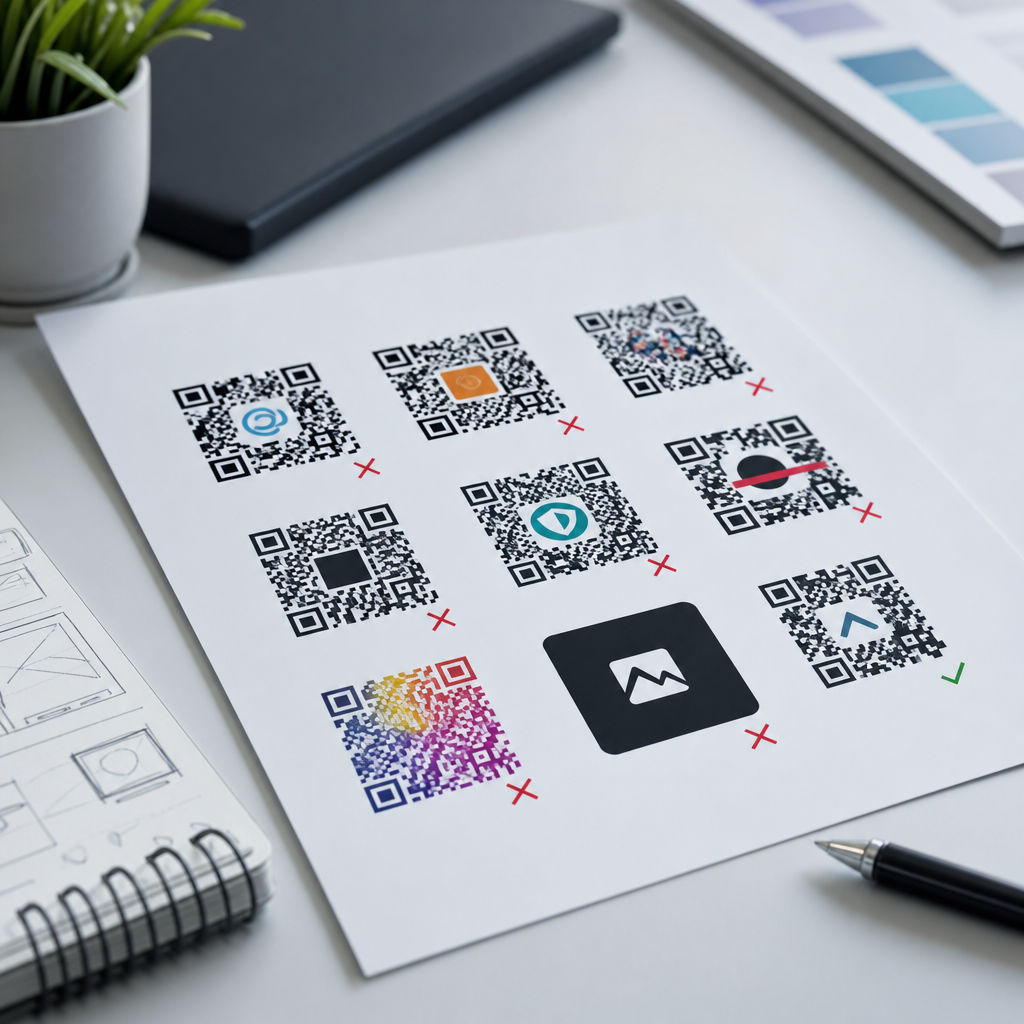
Common logo design mistakes in QR codes usually stem from one problem: treating a scannable data carrier like a decorative graphic. A branded QR code can improve recognition, trust, and campaign recall, but only when logo integration protects readability first. In practical terms, logo integration in QR codes means placing a brand mark, icon, or badge inside or around the code while preserving enough contrast, quiet zone, module integrity, and error correction for reliable scanning. This matters because a QR code that looks polished but fails to scan is not a branding asset; it is a conversion blocker.
Working on packaging, retail signage, menus, direct mail, and event materials, I have seen the same failure patterns repeat. Teams often approve a visually balanced design on a desktop monitor, then discover that glossy print, low light, camera autofocus, or a cramped placement on labels makes scanning inconsistent. The cost is larger than a missed scan. It affects attribution, customer trust, store operations, and campaign performance. For brands building a system around QR code design and branding, the logo-in-code decision becomes a central standard, not a one-off experiment.
This hub explains common logo design mistakes in QR codes and the principles behind successful logo integration in QR codes. It covers technical limits, layout choices, color and contrast, testing methods, print production concerns, and governance across teams. If you need a direct answer, here it is: the best branded QR codes keep the logo small, maintain a clear quiet zone, use high contrast, rely on dynamic codes when possible, and pass real-device testing at final size and final substrate. Everything else is refinement.
Why Logo Integration Changes QR Code Performance
A standard QR code works because scanners identify finder patterns, alignment patterns, timing patterns, and a grid of dark and light modules. When a logo is inserted into the center, those modules are removed or obscured. Error correction can compensate, but only within limits. QR codes use four common error correction levels: L, M, Q, and H, with H allowing the highest recovery from missing or damaged modules. Designers frequently assume that choosing H means they can place any logo at any size in the middle. That is false. Error correction is a safety margin, not permission to ignore structure.
The first mistake is oversizing the logo. In most production workflows, a center logo should occupy a conservative percentage of the total code area, and the exact limit depends on data density, module count, and output size. A short dynamic URL can survive a larger logo than a dense static payload containing tracking parameters, vCard data, or Wi-Fi credentials. This is why experienced teams generate the shortest practical payload, then evaluate logo size after the matrix is built. The code’s complexity determines the space available for branding, not the other way around.
The second mistake is using the wrong logo shape. Wide horizontal logos are harder to fit into the code center without covering critical modules than compact square or circular marks. In client work, I usually recommend a simplified brand symbol, monogram, or app icon rather than the full wordmark. The code scans better, and the mark remains legible at smaller sizes. Brands often discover that the same simplified asset also works better on social avatars, favicons, and packaging seals, so the QR decision can improve the wider identity system.
The third mistake is forgetting the scan environment. A code on a poster in a subway station faces motion blur, reflections, and variable distance. A code on a restaurant table tent may face dim warm lighting and food stains. A shipping label may be creased or printed with thermal limitations. In each case, logo integration consumes some tolerance. A plain black-and-white code might still scan under poor conditions, while a heavily customized code with a central logo may fail. Good branding decisions begin with use case severity, not only aesthetics.
Layout Mistakes That Break Scannability
The quiet zone is the empty margin around the QR code, and violating it is one of the most common layout mistakes. ISO/IEC 18004 defines how QR codes are structured, and scanners rely on separation between the symbol and surrounding graphics. When a logo badge, border, patterned background, callout sticker, or headline gets too close, detection becomes unreliable. This often happens in social graphics and product packaging where teams try to save space. The practical rule is simple: preserve the quiet zone on all four sides, even if that means reducing the logo, shrinking surrounding copy, or increasing the overall code size.
Another frequent mistake is decorating the finder patterns, the three large corner squares scanners use for orientation. Designers may turn them into eyes, buttons, rounded capsules, or brand icons. Some customization is possible, but the shape contrast and positional clarity must remain unmistakable. When finder patterns become too stylized, scanning speed drops sharply on older phones and lower quality cameras. The safest path is to keep finder patterns visually distinct from the rest of the modules and avoid replacing them with decorative symbols.
Misalignment inside logo frames also causes avoidable failures. A common treatment is placing the logo inside a white circular knock-out at the code center. This can work well, but only when the circle is centered precisely and sized with consistent padding. If the knocked-out shape drifts into dense module regions or becomes too large because someone adjusted it manually in Illustrator, the code may stop working. I have seen this happen after a last-minute brand review where the design file was edited without regenerating and retesting the code.
Designers also underestimate the effect of corners and containers. Putting a QR code inside a speech bubble, hangtag outline, or die-cut label may look engaging, but irregular containers can compress one edge of the quiet zone or create false borders that interfere with detection. The same issue appears when the logo is combined with a strong frame that is visually attached to the code. If a frame is needed, it should sit outside the quiet zone and maintain clear separation.
| Mistake | Why It Fails | Safer Practice |
|---|---|---|
| Oversized center logo | Obscures too many modules for the chosen data density | Use a shorter payload and reduce logo area |
| No quiet zone | Scanner cannot isolate the symbol from nearby graphics | Keep clear margin on all sides |
| Low contrast colors | Camera struggles to distinguish modules from background | Use dark foreground on light background |
| Stylized finder patterns | Orientation detection becomes inconsistent | Retain strong corner pattern recognition |
| Unverified print size | Modules become too small on final substrate | Test at production size with target devices |
Color, Contrast, and Visual Branding Errors
Brand teams often want QR codes to match palette standards exactly, but color fidelity must serve scannability. The main rule is that the foreground needs strong luminance contrast against the background. Dark code on light background remains the best-performing option. Reversed codes, such as white modules on a black field, can work in some reader apps but are less dependable across devices and third-party scanning libraries. Gradient treatments are riskier still, especially when midtones reduce edge clarity within small modules.
A major logo integration mistake is giving the logo too much visual priority through shadows, glows, bevels, or metallic effects. These effects may look premium in a presentation and then fail in print or on screens with compression artifacts. Foil stamping, embossing, varnish, and translucent inks are especially problematic because the camera reads reflected light, not branding intent. On luxury packaging, I usually advise pairing the branded code with a matte white underprint or a high-contrast label zone. That preserves the premium finish elsewhere while giving the code a controlled scan area.
Another error is placing a transparent logo over active modules without a defined knockout. If the logo contains fine internal details, thin strokes, or semi-transparent fills, the code beneath can visually interfere with the mark while also becoming harder to scan. A cleaner approach is to use a solid logo mark within a deliberate shape, typically a white square or circle with enough breathing room. Simplicity wins because cameras and people both read it faster.
Consistency matters across channels. A QR code that scans on a website hero banner may fail on corrugated packaging because dot gain, ink spread, and substrate texture alter the effective shape of the modules. A color choice that works on a bright OLED phone screen can collapse under fluorescent lighting in retail. The solution is not generic brand flexibility; it is a defined branded QR code specification with approved foreground colors, minimum sizes, and forbidden treatments.
Data Density, Size, and Production Problems
Many scanning issues blamed on the logo are actually data problems. A static QR code carrying a long destination URL with UTM parameters, campaign names, and platform tags creates a denser matrix with smaller modules. Add a logo, and the remaining tolerance shrinks. Dynamic QR codes solve this elegantly because the printed code points to a short redirect URL, while destination changes and analytics happen in the management platform. In practice, dynamic codes usually give brands more room for safe logo integration and far better campaign control.
Minimum size is another neglected factor. The right print size depends on scan distance, camera quality, and module count, but the principle is stable: as the code becomes denser, it must become physically larger to preserve module clarity. For packaging, shelf talkers, table tents, and brochures, teams should define a minimum rendered size for each payload class, then lock that into templates. Shrinking the code to make room for a larger logo is backwards. Increase the total symbol size first.
Print production introduces real-world distortion. Flexographic printing can spread ink into small white gaps. Thermal printers can produce uneven edges. Low-resolution office printers can create stair-stepping that harms finder pattern clarity. Laminates and curved bottles add glare and warp. A code that passes in a vector PDF can still fail once printed on kraft paper or wrapped around a can. This is why professional workflows test on final stock, with final finishing, at final scale. No screen proof can replace that step.
File handling can also degrade performance. Exporting a QR code as a low-resolution raster, resizing it disproportionately, or placing it in a layout application with anti-aliasing can blur module edges. When possible, keep the code in vector format such as SVG, EPS, or PDF until final output. If raster is required for digital channels, export at sufficient resolution and avoid compression that softens contrast. This sounds basic, but it is one of the most common causes of avoidable scan failure in fast-moving marketing teams.
Testing, Governance, and When to Use Less Branding
The most reliable branded QR codes are tested like products, not approved like artwork. That means scanning on iPhone and Android devices, using native camera apps and common third-party readers, under bright light, dim light, and angled glare. It means testing from expected user distance, on the actual installation surface, with people who were not part of the design process. In field audits, I have seen codes pass on flagship phones and fail on midrange devices that customers actually use. If your audience is broad, your test matrix must be broad too.
Governance is essential when QR codes appear across departments. Brand, packaging, retail, events, and performance marketing teams often generate their own versions, leading to inconsistent logo size, color, and destinations. A central standard prevents that drift. The standard should define approved generators, error correction defaults, dynamic versus static use cases, minimum size, quiet zone, logo asset versions, contrast requirements, print specifications, and test procedures. It should also state when not to use a logo inside the code at all.
That last point matters. Sometimes the strongest branding choice is placing the logo near the QR code rather than in it. If the use case is operational, high-volume, or mission-critical, such as payments, tickets, inventory, warehouse labels, healthcare forms, or access control, reliability should dominate. External branding can deliver recognition without sacrificing internal module area. The user does not care whether the logo sits in the center of the code; the user cares whether the scan works instantly.
For a sub-pillar hub on logo integration in QR codes, the practical takeaway is straightforward. Start with the use case, shorten the data, choose high error correction when appropriate, keep the logo compact, protect the quiet zone, use strong contrast, preserve finder pattern clarity, and test on final materials with real devices. Build those rules into templates and approval workflows so every campaign does not relearn them through failure. Review your current branded QR codes, document the weak spots, and update your design standard before the next print run.
Frequently Asked Questions
What is the most common logo design mistake people make when adding a logo to a QR code?
The most common mistake is treating the QR code like a branding canvas instead of a functional scanning tool. Many designs fail because the logo is given priority over readability, which undermines the entire purpose of the code. A QR code is not just a graphic element; it is a data pattern that scanners must interpret quickly and accurately. When a logo is made too large, placed without considering the code’s structure, or surrounded by distracting visual effects, the scanner may struggle to detect enough valid data to complete a successful read.
In practice, this usually happens when designers cover too many modules in the center of the code, reduce contrast between the dark and light areas, or alter the shape of the code so heavily that it no longer behaves like a standard QR symbol. While error correction can help recover some hidden or damaged areas, it is not a license to ignore technical limits. A good branded QR code starts with scan reliability, then adds the logo in a way that respects the code’s underlying geometry. If users cannot scan it on the first try, the branding has failed no matter how attractive the design looks.
How large can a logo be inside a QR code without causing scanning problems?
There is no one-size-fits-all percentage that works in every case, because logo size depends on the amount of encoded data, the QR code version, the selected error correction level, the printing size, and the scanning conditions. That said, a very common mistake is assuming the center area is “free space” that can safely hold a large brand mark. It is not. The more data your QR code contains, the denser the module pattern becomes, and the less room there is to cover with a logo without affecting scan performance.
As a general best practice, the logo should remain modest and should be tested in realistic use conditions rather than approved based on appearance alone. Designers often rely on higher error correction levels, especially level H, to support logo placement, but even then, excessive obstruction can still break readability. The safest approach is to keep the logo compact, place it in a controlled central area, avoid covering critical detection patterns, and generate the code specifically for logo integration instead of retrofitting the logo after the fact. Most importantly, test the final design across multiple phones, camera qualities, screen brightness levels, and print sizes. If the logo only scans under ideal conditions, it is too large or too intrusive.
Why do contrast and color choices matter so much in branded QR codes?
Contrast is essential because scanners need a clear distinction between the foreground modules and the background in order to recognize the code. One of the biggest logo-related design mistakes is choosing brand colors that look visually refined but reduce scan accuracy. Light gray modules on a white background, metallic finishes, gradients, transparent overlays, or low-contrast brand palettes may appear polished in a mockup, yet perform poorly in real-world environments where lighting, glare, motion, and camera quality vary.
For reliable scanning, the code should maintain strong contrast, typically with dark modules on a light background. If a logo is introduced, it should not blur that contrast or visually merge with nearby modules. Designers should also be careful with reversed color schemes, complex background images, and color combinations that are difficult for cameras to separate. Even if a branded QR code scans on one modern device, it may fail on older phones or in poor lighting. The safest way to preserve both branding and functionality is to keep the code structure visually simple, use a clean quiet zone, and ensure the logo complements rather than competes with the code’s readability.
What is the quiet zone, and how does it affect logo integration in QR codes?
The quiet zone is the clear margin around the outside of a QR code, and it plays a major role in successful scanning. It helps scanning software identify where the code begins and ends by separating it from nearby text, images, borders, patterns, or other design elements. A frequent mistake in branded QR design is squeezing the code into a layout too tightly or wrapping decorative elements, badges, frames, or logo treatments too close to the edges. When that clear space is reduced or cluttered, scanners may have trouble isolating the symbol correctly.
This issue becomes even more important when a logo is added, because the design is already asking the scanner to tolerate some visual customization. If the logo is inside the code and the quiet zone is also compromised outside the code, scan reliability drops further. A professionally designed QR code preserves sufficient blank space around the full symbol, even in ads, packaging, posters, and digital graphics where layout pressure is high. In other words, logo integration is not just about what goes in the middle of the QR code. It also depends on protecting the space around the code so scanners can detect and decode it consistently.
How can you brand a QR code effectively without making it harder to scan?
The best way to brand a QR code is to build the design around scan performance first and brand expression second. Effective branding does not require pushing the logo to the largest possible size or heavily customizing every visual component. In many cases, subtle branding works better: a well-placed small logo, brand-aligned colors with strong contrast, a clean frame with a call to action, and a properly generated code with adequate error correction can create a polished branded result without sacrificing usability.
It is also important to think beyond the logo itself. Branding can come from the surrounding layout, supporting copy, destination page, campaign visuals, and context of use. A QR code placed in a consistent brand environment often does not need aggressive modification to feel recognizable. The smartest process is to generate the QR code using a reliable tool, choose an error correction level appropriate for logo placement, preserve module integrity, maintain a proper quiet zone, and test the finished code extensively in real settings. That includes scanning from different distances, on different devices, in print and on screens, and under varied lighting. A branded QR code is successful when users recognize the brand and the code scans immediately, not when it simply looks customized in a design file.





