
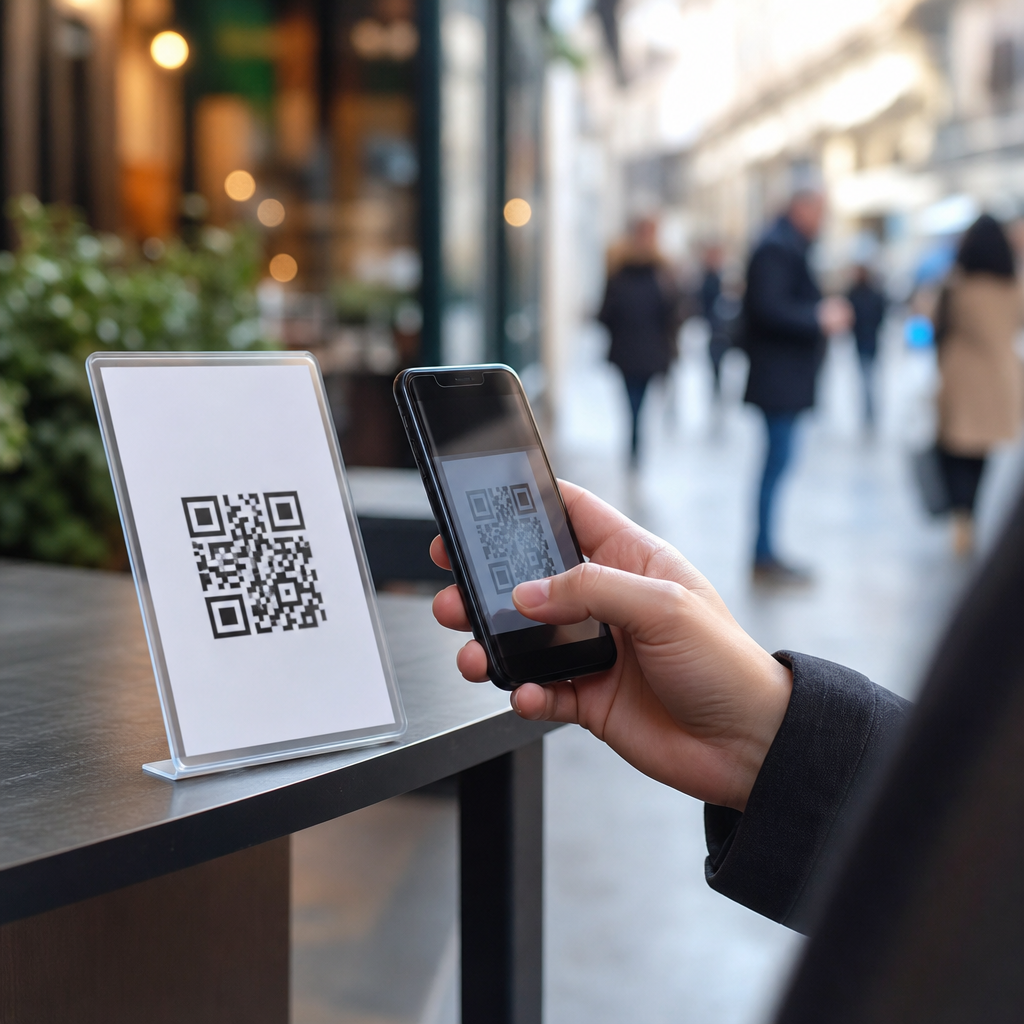
QR codes are now woven into everyday life, from restaurant menus and parking meters to transit posters, donation jars, and package lockers, yet their convenience hides a serious security problem in public spaces. A QR code, short for Quick Response code, is a machine-readable matrix barcode that stores data such as a website address, payment request, contact record, Wi-Fi credential, or app deep link. Because phone cameras open these codes instantly, people often trust them more than they would trust a typed link, even though the risk is fundamentally the same: a QR code can send a user anywhere. In security work, this attack pattern is often called quishing, or QR phishing, and it has become common because it exploits speed, habit, and limited visual verification. Public spaces amplify that danger. A malicious sticker can be placed over a legitimate code in seconds, and most people will not inspect a printed square before scanning.
I have seen this risk show up repeatedly in real deployments. Teams secure websites, payment gateways, and mobile apps, then overlook the paper sign taped to a kiosk or the acrylic placard on a café table. Attackers do not need advanced malware to profit. They only need a convincing redirect page, a fake login form, or a payment destination that looks plausible on a phone screen. The result can be credential theft, card fraud, malware installation, account takeover, location tracking, or simple financial loss. For organizations, the fallout extends further: brand damage, customer complaints, chargebacks, incident response costs, regulatory scrutiny, and breakdowns in public trust. Understanding QR code security risks in public spaces matters because these codes sit at the intersection of physical security, cybersecurity, privacy, and compliance. If a business uses QR codes at scale, it must treat them as an attack surface, not a marketing accessory.
Why public-space QR codes are uniquely vulnerable
Public QR codes are vulnerable because they are easy to replace, hard to authenticate visually, and typically scanned in moments of distraction. A person standing at a parking meter is thinking about leaving on time, not validating a URL. A traveler scanning a station poster may be balancing bags, checking schedules, and rushing to a platform. Attackers exploit exactly that context. The most common method is overlay fraud: printing a new sticker and placing it over the original code. More sophisticated versions include adding a fake “updated payment portal” note, creating a lookalike sign next to the real one, or using a short domain that resembles a trusted brand. Since most mobile camera interfaces show only a truncated preview, victims often miss subtle differences in spelling, subdomains, or country-code domains.
The problem is broader than obvious scams. QR codes can trigger actions that feel routine but carry hidden risk. A code can open a webpage that requests credentials, launch an app store page for a trojanized app, prefill a text message to a premium number, or connect a device to a hostile wireless network. Dynamic QR platforms, which route scans through an intermediate service for analytics or link management, introduce another layer of exposure if the platform account is compromised. Physical placement also matters. Codes posted outdoors can be tampered with after hours. Codes on shared surfaces can be replaced by anyone who appears to be cleaning or updating signage. In many environments, there is no inventory, no tamper-evident label, and no inspection routine. That combination makes public-space QR security less about cryptography and more about process discipline.
Common QR code scams and how they work
The most frequent QR code scams in public spaces fall into a handful of repeatable patterns. Payment diversion is the easiest to monetize. An attacker places a fake QR code on a parking meter, ticket machine, or charity collection box. The victim scans it, lands on a polished mobile payment page, enters card details, and either pays the attacker directly or has their card data harvested for later fraud. Credential theft is equally common. Fake QR codes on office notices, event posters, and apartment lobbies can point to counterfeit Microsoft 365, Google, banking, or delivery-service login pages. Once the victim signs in, the attacker steals the credentials and often the session token if the phishing kit supports it.
Malware delivery is another pattern, especially on Android, where sideload prompts or fake app update pages can be used to install spyware or banking trojans. Some scams are lower tech but still effective, such as codes that open a precomposed message to a scam number, dial a call center, or add a malicious contact. Others focus on data collection rather than immediate theft. A code at a public kiosk might direct users to a survey that captures names, emails, phone numbers, and geolocation under the guise of support or prize entry. I have also seen attackers use QR codes to mask business email compromise support lures: the code opens a page that says “verify your account to access the invoice” or “scan to retrieve secure voicemail.” The format feels novel, so users lower their guard even though the underlying social engineering is familiar.
| Scam type | Typical location | What the victim sees | Main risk |
|---|---|---|---|
| Payment diversion | Parking meters, ticket kiosks, donation signs | Mobile checkout page | Card theft or funds sent to attacker |
| Credential phishing | Posters, office notices, apartment lobbies | Brand login page | Account takeover |
| Malware delivery | Transit ads, public bulletin boards | App install or update prompt | Spyware or trojan infection |
| Data harvesting | Events, kiosks, contests | Survey or support form | Privacy loss and later fraud |
Red flags users should check before scanning
The safest habit is simple: treat every public QR code like an untrusted link. Before scanning, inspect the physical code and the context around it. Is the sticker layered over another sticker? Does the sign use inconsistent branding, odd fonts, or urgent language such as “re-scan now” or “payment system changed today”? At parking machines and public terminals, compare the printed instructions on the hardware itself with any added placard. If the code claims to be for a city service, check whether the sign includes the official municipal domain, permit number, or agency branding that matches nearby assets. Tamper-evident laminates, etched surfaces, and professionally mounted signage are generally safer than loose paper labels, but none are guarantees.
After scanning, pause at the link preview. On iPhone and Android, users can usually see the destination domain before opening it. That preview is the decisive moment. Look for the core domain, not just words in the path. For example, city-parking-payments.example is not the same as city.gov. Be wary of shortened links, unusual top-level domains, extra hyphens, or misspelled brand names. Secure transport alone is not proof of legitimacy; a padlock only means the connection is encrypted. Also watch for pages that demand immediate login, request unusual permissions, or ask to install a profile, certificate, or application outside the official app store. If a code is meant to connect you to Wi-Fi, confirm the network name with staff first. If it is meant to take payment, compare it with the business website or app you already know.
How businesses and municipalities can reduce QR code risk
Organizations can reduce QR code scams with a blend of design controls, operational checks, and user guidance. The first control is ownership. Every public-facing QR code should have an inventory record that states its purpose, destination, physical location, owner, and review date. Without that inventory, no one knows what is deployed, what has changed, or what should be removed. The second control is tamper resistance. Use direct printing on durable surfaces where possible instead of adhesive labels. If stickers must be used, apply tamper-evident materials that tear or leave residue when lifted. Place codes behind clear panels or inside locked frames in high-risk locations. Add human-readable URLs next to the code so users can compare the destination independently.
Operationally, inspection frequency matters more than most teams expect. A code in a busy station or outdoor parking area may need daily checks; a code inside a staffed lobby may need less frequent review. Train frontline staff to recognize overlays, duplicate signs, and customer reports of strange redirects. Dynamic QR services should be protected with strong administrative controls, including multifactor authentication, role-based access, and audit logs. If a code leads to payment, use brand-controlled domains and minimize redirects. For sensitive workflows, route users to an app or mobile web page that displays a recognizable trust marker, such as a matching order number, meter ID, or venue identifier. In mature programs, QR deployments are folded into physical security rounds, digital asset management, and incident response playbooks rather than left to marketing teams alone.
Privacy, compliance, and the hidden data trail behind scans
QR code security is not only about scams. Privacy exposure is built into many deployments. Dynamic QR platforms often log scan time, IP address, approximate location, device type, operating system, referral data, and campaign metadata. That information can be useful for analytics, but it can also create compliance obligations. If the scan journey collects personal data through forms, loyalty signups, payments, or authentication, the organization may be subject to privacy and consumer protection requirements. Depending on the jurisdiction, that can mean notice obligations, consent rules for certain tracking practices, data retention limits, vendor due diligence, cross-border transfer controls, and a lawful basis for processing. Public-sector deployments may face even stricter procurement and records requirements.
There is also a gap between user expectation and actual data handling. People often assume scanning a QR code is equivalent to reading a static sign, when in reality it may initiate a trackable digital interaction. That gap creates trust risk. The safer pattern is transparency: tell users what the code does, what domain will open, whether analytics are used, and whether payment or identity verification is involved. From a risk perspective, organizations should treat QR landing pages like any other externally facing application. Run secure configuration reviews, maintain TLS properly, monitor for domain impersonation, and test for phishing-resistant flows where feasible. If a campaign uses a third-party QR management vendor, contract terms should address security incidents, log access, data retention, subprocessor use, and deletion. Public-space convenience should never become an excuse for opaque data practices.
Response steps when a malicious QR code is found
When a malicious QR code is discovered, speed matters. The first step is physical containment: remove or cover the code, photograph the scene, preserve the sticker or sign if possible, and document the exact location and time. The second step is digital verification. Confirm the legitimate destination, identify the malicious URL, and determine whether redirects, cloned pages, or fake payment endpoints were involved. If the scam used your brand, notify your security, legal, fraud, and communications teams immediately. Takedown requests may be needed for hosting providers, registrars, payment processors, or app stores. If customer data or payments may be affected, assess notification obligations under applicable laws and payment rules.
From experience, the most useful follow-up is not only eradication but pattern analysis. Review CCTV if available, check nearby locations for similar overlays, search for reports on social media, and inspect whether the attacker reused the same domain, design template, or payment account elsewhere. Update the inventory, change vulnerable workflows, and retrain local staff. For users who may have scanned the code, the advice should be concrete: stop entering information, close the page, monitor card statements, change passwords if credentials were submitted, enable multifactor authentication, and run mobile security scans where appropriate. QR code security risks in public spaces are manageable, but only if organizations stop treating the printed code as harmless. Audit your deployments, publish clear usage guidance, and make every public scan verifiable before customers are asked to trust it.
Frequently Asked Questions
What makes QR codes in public spaces risky compared with ordinary web links?
QR codes feel safer than typed links because they are scanned with a phone camera and often appear on trusted physical objects such as tables, payment terminals, posters, flyers, parking meters, and parcel lockers. That sense of familiarity is exactly what makes them risky. A person can usually inspect a written URL before visiting it, but a QR code hides its destination until after the scan. In busy public environments, people tend to act quickly and assume the code is legitimate, especially when it is placed where a real code would normally be.
Another major issue is how easy QR codes are to replace or cover. A criminal can print a fake code on a sticker and place it over a real one in seconds. To the average passerby, both codes look equally valid. Once scanned, the malicious code may send the user to a phishing page, trigger a fake payment request, download a harmful app, open a fraudulent login screen, or prompt the phone to connect to unsafe networks or services. Public spaces increase the danger because people are often distracted, in a hurry, and less likely to verify what they are opening.
The combination of instant scanning, hidden destinations, and social trust makes QR-based attacks unusually effective. The threat is not the black-and-white square itself, but the fact that it can deliver users into scams before they pause to question what is happening.
How do scammers use fake QR codes in places like restaurants, parking meters, and transit stations?
Scammers usually rely on simple physical tampering and convincing digital impersonation. In a restaurant, they may place a fake QR code over the real menu code so customers are redirected to a counterfeit website that asks for card details, login credentials, or app downloads. At parking meters, the fake code may lead to a payment page that looks official but sends money directly to the attacker. In transit stations, posters or ticketing instructions can be altered to push riders toward fake fare portals or malicious apps that imitate legitimate transit services.
Donation jars, event flyers, public bulletin boards, vending machines, and package lockers are also common targets because people expect QR-based actions in those places. The scam works best when the destination page visually matches the expected brand. Attackers often copy logos, colors, and wording from the real business so the user sees what looks like a normal payment or login screen. Some scams are designed purely to steal money, while others collect usernames, passwords, phone numbers, or card data for later fraud.
More advanced attacks can direct users to sites that exploit browser permissions, prompt them to install software, or open deep links into apps that trigger unintended actions. In every case, the attacker is counting on the user to trust the physical placement of the QR code instead of verifying the digital destination behind it.
What warning signs should people look for before scanning a QR code in a public place?
The first warning sign is physical tampering. If a QR code appears to be a sticker placed on top of another sticker, has uneven edges, looks newly attached, or seems out of place compared with surrounding signage, treat it with suspicion. A code that appears on an unofficial surface, uses poor printing quality, or lacks branding where branding would normally be present should also raise concern. In payment situations, compare the code with other posted instructions. If the wording, logo, or placement seems inconsistent, it may be fraudulent.
After scanning, pay close attention to the preview your phone shows before opening the link. Check the domain name carefully, not just the page design. Attackers often use lookalike addresses with small spelling changes, added words, unusual endings, or extra subdomains to imitate trusted brands. If a menu code leads to a login page, a parking code opens a strange shortened URL, or a transit poster asks for excessive personal information, stop immediately. Those are strong indicators that the code is not legitimate.
It is also wise to be skeptical of urgency. Messages such as “pay now,” “verify immediately,” “session expired,” or “download this required app” are classic social engineering tactics. A genuine public QR code usually leads to a clear, expected action with minimal friction. If the scan result asks for information that does not match the situation, that mismatch itself is a red flag.
What are the safest ways to use QR codes without avoiding them completely?
The safest approach is to treat every public QR code as untrusted until verified. Before tapping through, review the link preview and make sure the web address matches the organization you expect. If you are paying for parking, ordering food, or accessing a service, consider navigating to the organization’s official website or app manually instead of relying on the code. For example, use a known parking app, the restaurant’s official site, or a transit app downloaded from a reputable app store.
Keep your phone updated so the browser, operating system, and security protections are current. Use built-in scam detection features when available, and avoid installing apps from prompts that appear immediately after a scan. Be cautious about granting permissions such as location access, camera access, contact access, or Wi-Fi configuration unless you clearly understand why they are needed. If the code opens a payment page, confirm that the connection is secure and that the business name, URL, and checkout flow make sense.
Whenever possible, verify with a human or an official source. Ask staff whether a code is current, compare it with codes displayed on the business’s official website, or look for printed instructions that provide an alternative path. Safe QR use is really about slowing down just enough to verify the destination before you interact with it.
What should someone do if they scanned a suspicious QR code or entered information on a fake page?
If you scanned the code but did not enter any information, close the page immediately and do not interact further. Clear the browser tab and avoid downloading anything the page suggested. If the site asked for permissions and you granted them, review your phone’s settings and revoke anything unnecessary. Also check whether a new app, calendar event, profile, Wi-Fi network, or browser notification was added after the scan.
If you entered login credentials, change the password for that account right away and update any other accounts using the same or similar password. Enable multi-factor authentication if it is available. If you entered payment card information, contact your bank or card issuer immediately, report the incident, monitor for unauthorized charges, and ask whether the card should be frozen or replaced. If you submitted personal data such as your phone number, email address, or address, be alert for phishing follow-ups, identity fraud, and account takeover attempts.
It is also important to report the fraudulent QR code to the business, venue operator, transit authority, or property manager so it can be removed before others are affected. If money was stolen or malware may have been installed, consider filing a report with local authorities or relevant cybercrime reporting channels. Quick action can limit the damage, protect your accounts, and help prevent the same scam from spreading to more people in the same public location.





