
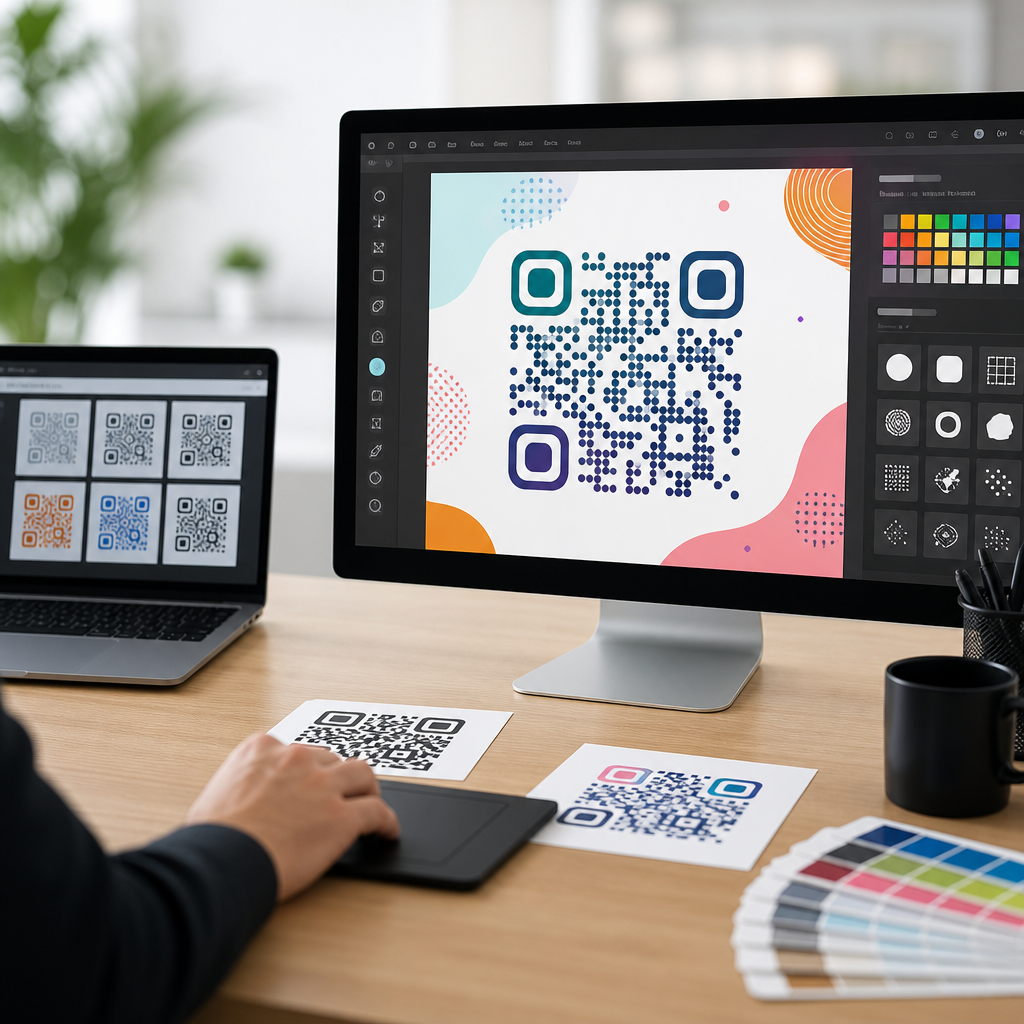
Creative QR code design tools for campaigns have moved far beyond black squares on white backgrounds, turning a once purely functional barcode into a branded entry point for customer action. In practice, custom QR code design tools let marketers change colors, frames, corner markers, logos, destination rules, and scan behavior without breaking usability. That distinction matters because a campaign QR code is not just an image asset; it is a conversion surface that sits on packaging, direct mail, event signage, retail displays, menus, and paid media. When I build QR programs for launches or seasonal promotions, the most successful assets balance visual identity with technical readability, using enough customization to attract attention while preserving error correction and contrast. Brands that ignore design often get ignored by customers, while brands that overdesign can create scan failures that waste spend. A strong hub on custom QR code design tools therefore has to address both creativity and performance. It should explain what the tools do, which features actually matter, how different campaign types change design choices, and what teams should measure after launch. For any marketer responsible for print, packaging, or omnichannel response, understanding these tools is now a practical requirement, not a nice extra.
What custom QR code design tools actually do
Custom QR code design tools generate editable QR codes while preserving the encoded data pattern required for smartphone cameras to read them. At the simplest level, a tool converts a URL, vCard, PDF, app link, coupon, or payment request into a scannable matrix. The better platforms then layer design controls around that matrix: module shape, eye shape, background treatment, logo insertion, call-to-action frame text, brand color palettes, short URL masking, batch generation, and dynamic redirects. Dynamic functionality is especially important for campaigns because it separates the printed code from the final landing page. If an event venue changes, inventory runs out, or a market-specific page needs replacing, the code stays the same while the destination updates in the dashboard.
In real campaign work, that flexibility saves reprint costs. A retailer can place one dynamic QR code on window clings nationwide, then route scans by store region, operating hours, or language. A beverage brand can print a summer promotion code on cans and rotate the destination weekly from sweepstakes entry to recipe content to loyalty enrollment. Static codes still have value for permanent uses such as Wi-Fi access or basic contact sharing, but for paid campaigns, dynamic management is usually the correct default. It supports analytics, A/B testing, link governance, and expiry rules that static codes cannot provide after distribution.
Most professional tools also include file export options such as SVG, EPS, PDF, and PNG. Vector formats matter for print because they scale cleanly across a business card, trade show banner, or transit poster. Experienced designers know that raster files can soften edges when enlarged, and softened edges increase scan friction. Good tools therefore combine branding controls with production-quality output, quiet-zone protection, and downloadable assets for creative teams using Adobe Illustrator, Figma, or Canva.
Core design features that influence campaign performance
The most important custom QR code design features are contrast, logo placement, error correction, frame messaging, and destination type. Contrast remains nonnegotiable. Dark modules on a light background are still the most reliable configuration because phone cameras identify edge differences first. Brand teams often want reversed or low-contrast palettes, but pastel-on-white combinations frequently underperform under glare, distance, or poor lighting. A navy code on cream can work; pale yellow on white usually will not. I test every design on multiple devices because iPhone and Android camera processing can react differently to the same visual treatment.
Logo placement is the next variable. A centered logo helps reassure users that the code is official, which can improve scan confidence, especially in financial services, healthcare, and high-value retail. But the logo occupies data area, so the code must compensate through higher error correction and sufficient overall size. Most campaign tools support error correction levels based on the ISO/IEC 18004 standard. Higher correction allows more obstruction, but it also increases density, which can make a small printed code harder to scan. The design decision is never “more is always better.” It is “what size, distance, and print surface will this code face?”
Frame text such as “Scan to claim 20% off” often improves response more than decorative styling. It tells users what happens next and reduces ambiguity. In direct mail tests I have run, codes with a clear benefit statement consistently outperformed visually attractive codes with no instruction. The destination type matters too. Sending a scan to a mobile-optimized landing page with a single action produces better results than dropping users onto a desktop homepage. A campaign QR code should complete a journey, not create another search task.
How to evaluate QR code design platforms
Choosing among custom QR code design tools starts with workflow, not aesthetics. The right platform must fit the way your team launches campaigns, approves creative, and reports results. For a solo consultant, simple templates and quick download options may be enough. For an enterprise brand, the platform needs role-based access, brand asset controls, custom domains, API support, analytics exports, and governance for hundreds or thousands of codes. Adobe Express, Canva, QR Code Generator Pro, Bitly, Flowcode, Beaconstac, Uniqode, and Scanova each occupy a different point on that spectrum.
When comparing tools, I look at five things first: dynamic code support, scan analytics, design flexibility, export quality, and security controls. Analytics should show unique scans, total scans, time trends, device breakdown, and geography at minimum. Better products also integrate with Google Analytics using UTM parameters, letting teams connect scans to sessions, conversions, and assisted revenue. Design flexibility should include editable eyes, modules, colors, and frames without forcing gimmicky effects that damage readability. Security controls should include HTTPS destinations, password protection when needed, and the option to use a branded short domain instead of a generic redirect domain that may reduce trust.
| Evaluation area | What to check | Why it matters for campaigns |
|---|---|---|
| Dynamic editing | Can you change the destination after printing? | Prevents reprint costs and supports live optimization |
| Analytics | Unique scans, location, device, time, conversion tagging | Shows whether the creative and placement are working |
| Design controls | Logo, frame text, colors, module and eye customization | Aligns the code with brand identity without losing function |
| File output | SVG, EPS, PDF, PNG at print-ready quality | Ensures sharp reproduction across formats and sizes |
| Governance | User permissions, folders, custom domains, API | Keeps large campaign libraries organized and secure |
Price should be evaluated in context. A free generator is acceptable for a one-off flyer, but campaigns involving media spend, packaging runs, or compliance review justify paid infrastructure. The cost of one misprinted code on packaging can exceed a year of subscription fees.
Best use cases for creative QR codes in campaigns
Creative QR code design tools are most valuable when the code itself must earn attention in a busy environment. On product packaging, the code can act as a bridge to recipes, installation guides, loyalty sign-up, warranty registration, or authenticated product storytelling. On event signage, a branded frame can guide attendees to schedules, maps, lead forms, or session voting. In out-of-home media, the challenge is distance and scan speed, so designs must stay simpler and larger than what works on a brochure. In restaurant and hospitality settings, custom QR codes can reinforce atmosphere while linking to menus, room service, or local offers, but they still need strong contrast under mixed lighting.
Direct mail remains one of the strongest use cases because the recipient is physically close to the code and can scan at leisure. Here, a custom design paired with a personalized landing page can outperform generic URLs. Real estate teams use branded QR codes on signs to send buyers to virtual tours and appointment forms. Healthcare providers use them on intake packets and pharmacy handouts, though design freedom may be narrower because trust and clarity outweigh novelty. Nonprofits use campaign QR codes on posters and gala materials to drive donations, where the frame message and payment flow matter more than decorative complexity.
The common thread is intent matching. If the user is likely to scan quickly in motion, such as in transit advertising, the code must prioritize size and simplicity. If the user has more time, such as while opening mail or browsing packaging at home, design can be richer. The tool should support both extremes without forcing one template style.
Design rules that keep custom QR codes scannable
The best creative QR code is the one that scans immediately. That means every custom QR code design tool should be used within practical limits. Start with adequate size. A common rule used in print production is a minimum of roughly 2 x 2 centimeters for close-range scanning, but larger is safer, especially when a logo is added or the placement surface is curved. For posters and displays, size should increase with viewing distance; a small code on a subway platform is a wasted asset. Maintain the quiet zone, the empty margin around the code, because nearby text or graphics can interfere with detection.
Avoid glossy placement when possible. Codes on reflective packaging, laminated menus, vehicle wraps, or storefront glass can become unreadable under sunlight or spotlights. Curved surfaces add another challenge. A code wrapped too tightly around a bottle neck or narrow tube distorts the matrix and reduces scan reliability. In packaging reviews, I often request relocation to a flatter panel even when the original position looked better visually. Good tools cannot compensate for bad physical placement.
Testing should be systematic, not casual. Scan on current iPhone and Android models, both native camera apps and common social camera environments. Test indoors, outdoors, in low light, and at the real viewing distance. Print proofs before approving volume runs. If the code uses a custom domain redirect, verify that the destination loads quickly and securely. A successful scan that opens a slow or broken page still fails the campaign.
Measurement, optimization, and campaign governance
Once a campaign launches, custom QR code design tools become measurement platforms. Scan rate by placement is the first signal to watch. If one poster design is scanned three times more often than another, the difference may come from creative treatment, frame copy, physical location, or audience intent. Dynamic tools let teams duplicate a code style across multiple placements while assigning unique tracking parameters, which makes comparison cleaner. This is where disciplined naming conventions matter. Every code should identify campaign, channel, asset version, geography, and launch date in the dashboard.
Optimization usually comes from small changes. A stronger call to action, a larger print size, a cleaner landing page, or a more trusted branded domain can increase results without redesigning the entire campaign. For mature teams, QR analytics should connect to broader reporting. Google Analytics 4, CRM records, point-of-sale systems, and marketing automation platforms can show whether scans generated qualified leads, revenue, sign-ups, or repeat visits. Scan volume alone is not enough. A code that produces fewer scans but higher purchase rate may be the better asset.
Governance becomes essential as libraries grow. Expired promotions, redirected domains, and reused assets can create customer confusion or compliance risk. Establish ownership, archival rules, and review cycles. In regulated sectors, keep logs of destination changes and approval history. The practical advantage of a strong QR platform is not just making attractive codes; it is controlling them throughout their lifecycle.
How this hub supports the broader QR code creation and tools topic
As a hub within QR code creation and tools, custom QR code design tools connect strategy, production, analytics, and channel execution. Teams exploring this area usually need more than a list of generators. They need to understand when to use static versus dynamic codes, how to prepare artwork for print, how to test scan reliability, how to brand codes safely, and how to measure post-scan behavior. This page anchors those decisions by focusing on the design layer while pointing logically to adjacent topics such as QR code analytics, packaging implementation, bulk generation, restaurant menu codes, event check-in flows, and secure branded redirects.
The main takeaway is simple: campaign QR codes work best when design serves function. Use custom QR code design tools to strengthen recognition, improve trust, and match the surrounding creative, but never at the expense of scan speed or landing-page relevance. Choose platforms based on dynamic management, analytics depth, export quality, and governance, not just visual templates. Test on real devices, in real conditions, and against real campaign goals. If you are building or refreshing your QR program, start by auditing your current codes, tools, and scan data, then standardize a design system your team can scale confidently.
Frequently Asked Questions
What are creative QR code design tools, and how do they help campaign performance?
Creative QR code design tools are platforms that let marketers customize the visual appearance and behavior of a QR code while keeping it scannable and reliable. Instead of using a standard black-and-white square, these tools make it possible to apply brand colors, add custom frames or calls to action, modify corner markers, place a logo in the center, and choose landing destinations that fit a specific campaign goal. For marketing teams, that matters because a QR code often appears in places where attention is limited, such as product packaging, direct mail pieces, event signage, in-store displays, and print ads. A well-designed code can stand out, reinforce brand recognition, and give people more confidence about where the scan will lead.
From a performance standpoint, the best creative QR code design tools do much more than visual styling. They often include dynamic URL management, scan analytics, device-based routing, A/B testing support, expiration rules, and editing capabilities after print. That combination turns a QR code into a measurable campaign asset rather than a static image. If a code appears on thousands of printed mailers or packages, the ability to update the destination without reprinting can protect budget and improve campaign agility. In short, creative QR code design tools help campaigns by combining stronger branding, clearer user prompts, and smarter tracking into one scanable touchpoint.
How can you customize a QR code without making it hard to scan?
The key is balancing visual creativity with technical readability. Most modern QR code design tools allow customization of colors, shapes, quiet zones, and embedded logos, but the code still needs enough contrast and error correction to scan quickly across different devices and lighting conditions. As a rule, dark foreground elements on a lighter background remain the safest choice. Using low-contrast color combinations, heavily patterned backgrounds, or overly stylized data modules can reduce reliability, especially when the code is printed small or viewed at awkward angles. Good tools usually provide built-in validation to show whether a design remains scan-friendly before it is downloaded or published.
It also helps to preserve the essential structure of the code. Leaving adequate white space around the QR code, avoiding distortion of the corner detection markers, and selecting an error correction level that supports logo placement are all important. Marketers should always test the final version across multiple smartphone cameras, operating systems, and real-world conditions before rollout. Scan testing should include glossy packaging, matte print, outdoor signage, and low-light environments if those are part of the campaign. A creative QR code works best when the design supports trust and recognition without interfering with the instant usability people expect from a quick scan.
Which features should marketers look for in a QR code design tool for campaigns?
The most useful QR code design tools for campaigns combine branding controls with campaign management features. On the design side, marketers should look for options to customize colors, frames, eye shapes, corner markers, gradients, background treatments, and logo placement. A strong platform should also generate high-resolution file formats suitable for both digital and print use, including SVG, PNG, and PDF. These options matter because a campaign QR code may need to appear consistently across packaging, brochures, billboards, display ads, and social graphics, each with different production requirements.
On the campaign side, dynamic QR codes are especially valuable because they allow destination changes after the code has been distributed. That is critical for time-sensitive promotions, regional offers, product updates, and multi-stage customer journeys. Marketers should also prioritize analytics dashboards that show scan counts, time of scan, location data when available, device type, and traffic trends. Additional helpful features include UTM parameter support, password protection, retargeting integrations, bulk generation, team permissions, and rules-based routing by language, geography, or device. The best tool is not simply the one that creates attractive codes; it is the one that helps a campaign remain flexible, measurable, and easy to optimize over time.
Why are dynamic QR codes better than static QR codes for marketing campaigns?
Dynamic QR codes are generally better for marketing campaigns because they let you change the destination URL or content behind the code without changing the printed or published image itself. That flexibility is extremely important in campaigns that run across packaging, direct mail, retail displays, or event materials, where reprinting can be expensive and slow. If a landing page changes, an offer expires, inventory shifts, or regional messaging needs adjustment, a dynamic code can be updated almost instantly. Static QR codes, by contrast, permanently encode the destination information and usually require a brand-new code if anything changes.
Dynamic QR codes also unlock the measurement and control features marketers need. Most platforms attach analytics to each code, making it easier to track scans by source, compare campaign placements, and identify which creative executions drive the strongest engagement. Some tools support scheduling, scan limits, redirect rules, and segmentation based on language or device type. That means a single QR code printed on a campaign asset can still deliver a more tailored user experience behind the scenes. For brands trying to treat QR codes as conversion surfaces instead of simple links, dynamic functionality gives them the adaptability, reporting, and optimization potential needed for serious campaign use.
What are the best practices for using branded QR codes on packaging, print, and in-store materials?
The first best practice is to give the QR code a clear purpose and a strong call to action. People are far more likely to scan when they understand what they will get, whether that is a discount, product tutorial, loyalty reward, registration page, menu, or exclusive content. A branded frame around the code with short action-oriented copy like “Scan to save,” “Scan for demo,” or “Scan to unlock offer” can improve engagement substantially. Placement also matters. On packaging, the code should be easy to find and not wrapped around a curved edge if avoidable. In print and direct mail, it should have enough size and contrast to scan comfortably without forcing users to reposition their phones repeatedly.
Another best practice is to align the destination experience with the context of the scan. A code on product packaging should lead to a mobile-friendly page that feels directly connected to the item in hand. A code in a retail environment might work best when it opens a fast-loading page with local inventory, coupons, or product comparisons. Brands should also test materials in real conditions, including different print finishes, viewing distances, and lighting environments. Finally, use tracking and analytics to evaluate performance by channel. When campaign teams know which package version, mail drop, poster location, or store display generated the most scans, they can refine both the design and the offer. A branded QR code performs best when the visual design, message, placement, and landing experience all work together as one coordinated conversion path.





